From a still image to motion
Upload PNG, JPEG or WebP and describe the action. First/last-frame, reference and duration controls depend on the selected model; the browser path needs no local GPU or coding.
O07No animation skills? Start with character art and describe how it should move.
PRODUCT OVERVIEW
AnimGen is a browser-based tool for turning character images into 2D animation assets. Its main value is opening animation creation to people who cannot draw motion frame by frame or rig a character: start with an image you can use, describe an action such as walking, idling or attacking, and let a supported AI model produce motion to work with. You do not have to learn an animation package before making your first candidate.
After generation, choose a useful segment, preview its loop and set the frames and output size. Export PNG sequences, a sprite sheet with JSON or an engine-oriented package. Existing MP4, WebM and MOV videos can also enter the Studio editing/export path without another model generation. The optional Advanced Editor adds frame ordering, duplication, deletion, position and size adjustments; it is not the starting requirement.
This changes the task from drawing every pose to describing, choosing and refining motion. Character consistency, clean edges and a convincing loop still need your judgement; exported assets do not include a complete character controller. The official API and MCP can also bring generation and file retrieval into an external coding-agent workflow.
Disclosure: AnimGen is developed by the owner of MakeGameWithAI. This page is based on public sources; official documentation and developer-produced examples are not independent user reviews.
Use the browser Studio with a verified account and available credits. API and MCP are Public Beta and share the account balance; developer access has a baseline tier, while subscriptions increase limits. Advanced formats require the relevant paid access. Keep API keys on a trusted local host or server.
Upload PNG, JPEG or WebP and describe the action. First/last-frame, reference and duration controls depend on the selected model; the browser path needs no local GPU or coding.
O07Trim generated or imported video, preview a repeating range and optionally refine frames in the desktop Advanced Editor, currently Preview. No bone rig or multi-track timeline is promised.
O09O18PNG ZIP, sprite sheet/JSON and Unity, Godot 4, Unreal Paper2D, Cocos and Construct 3 packages provide file handoff. Alpha Key uses genuinely transparent inputs for supported transparent exports.
O08O10O11O21Official REST and OAuth MCP cover discovery, upload, quoting, asynchronous tasks and downloads. This automates a documented asset workflow, not every operation in the visual editor.
O12O13O14O19INTERFACE & EXAMPLES
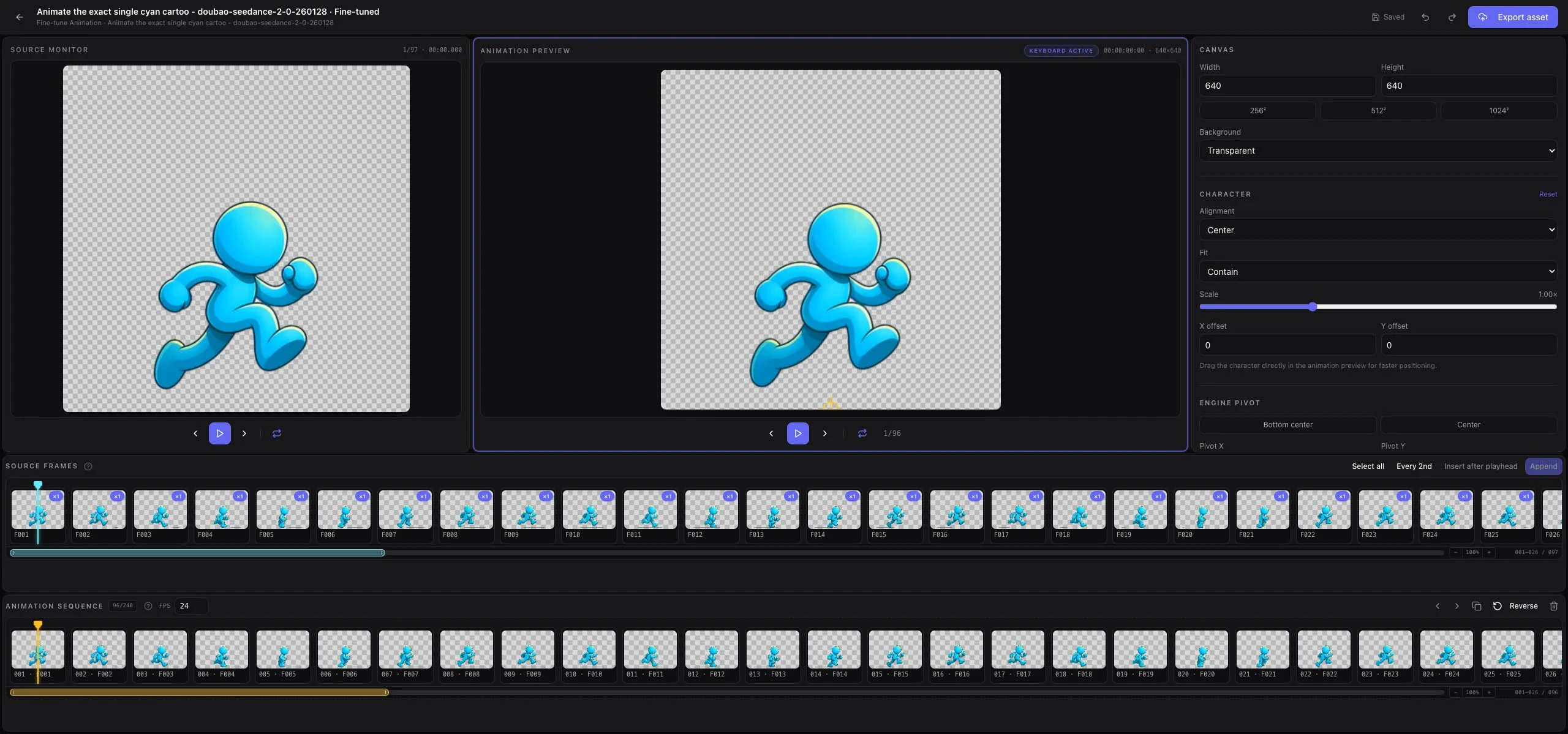
Official interface screenshot: inspect the generated frames, arrange an animation sequence and adjust the canvas. Advanced editing is optional; starting from an image and a motion description does not require mastering this screen.
This page assesses the documented route from an image or video to pre-generated 2D assets. It does not rank motion quality, promise complete game production or replace independent user experience with the owner's examples.
Beginner scope: A person without animation training uses browser Studio to generate one motion candidate from authorized art, select a clip and export PNG frames; advanced editing and API integration are optional later steps.
Agent scope: An external coding agent such as Codex or Claude Code submits a bounded image-to-animation request and saves its resulting files, with human authorization, spending approval and output review.
Confidence: learning Low · Agent Medium
These are independent editorial judgments, not an overall score or a claim of hands-on agent integration testing.
KEY FINDINGS
The official contract includes file transfer, quotes, asynchronous generation and downloads. MCP enforces quote/budget checks per operation; the REST API's separate quote does not provide the same server-side cap.
O12O14O15O20O21EDITORIAL VERDICT
AnimGen is worth considering when you have a character image and an animation idea but lack the skills to animate it yourself. It offers a starting point through description and selection instead of requiring frame-by-frame drawing or rigging first. Its game-oriented exports and official MCP/API also make the resulting files easier to place in an asset workflow.
BETTER FIT
POORER FIT
WORKFLOW FIT
Start with an authorized character image, describe one simple action, inspect the model's options and approve a small generation budget. Compare the motion and select the useful segment.
Preview the loop, choose frames and size, and export PNGs or an entitled sprite/engine format. Use the Advanced Editor only if frame ordering, positioning or replacement is needed.
Authorize the official MCP, discover a model, transfer the real image bytes, quote an explicit request and approve it. Persist one task ID, poll it, then download and inspect the files.
RECOMMENDED WORKFLOW
Start from a testable brief, then move through prototyping, assets, audio, testing, and release with an explicit handoff and human check at every step.
SHORTEST RESPONSIBLE PATH
This is a low-risk starting workflow synthesized from the evidence.
Choose an image you can use and one action such as an idle or walk. For the Alpha Key route, use an image with real transparency.
Open Studio, verify the account and inspect the available credits and current model quote before generating.
Describe the action, generate one bounded candidate and select its most useful range. You do not need to master the Advanced Editor first.
Preview repetition, set frames and output size, then download an available format and inspect its actual pixels.
For a commercial project, confirm paid-use rights. Decide on further generations or agent automation after inspecting the first result.
PRICING & RIGHTS
Pricing and terms last checked: Oct 1, 2026
The vendor's September 11, 2026 case used a transparent character image and requested 4 seconds at 480p with Seedance 2.0 Fast, plus a 16-frame 256×256-per-frame sprite sheet and JSON. That task cost 36 credits: 36 generation + 0 export. The following allocations assume the same request still quotes 36 credits; no current live task quote was obtained.
O02O03O17A one-time pool with 365-day credits and advanced-format access. This is the cash purchase, not the price of one finished animation; storage and developer concurrency do not increase.
$4.99 × 36 ÷ 500 = $0.35928. At that unchanged historical quote, 500 credits fit 13 candidate tasks with 32 credits left. Sixteen frames describe one animation sequence, not sixteen animations. Re-quote before any new request.
At the same historical 36-credit quote, the allocation is about $0.327 per candidate, or 30 whole tasks with 20 credits left. Monthly expiry applies; this capacity is an alternative to the pack, not additional free tasks or guaranteed accepted animations.
Include rejected successful generations, extra processing, editing time and engine work. The vendor case needed a corrected sprite-sheet export from its original video, which it reports used no extra credits. That does not establish future retry or correction costs.
The 36-credit quote is historical and vendor-reported, not a current tariff, independent test or promise of a game-ready animation for $0.36. Model options, accepted count, retries and cleanup time remain unknown for a new task.
Paid outputs may be used commercially subject to input rights, applicable terms and third-party conditions. Free evaluation does not include commercial use, and retroactive rights for free outputs after upgrading were not confirmed. Permission is not exclusivity, copyright eligibility or a non-infringement guarantee; older accounts may have accepted older terms.
Cancellation is best-effort and work already incurred can remain charged. Documented credit returns for certain pre-delivery moderation failures are not a blanket refund for unwanted results, every failure or cash purchases. Review current terms and the request quote before spending.
PRODUCTION RISKS
Inspect pose, character details, proportion, foot placement, loop transitions and edges. The current evidence does not establish acceptance rates or consistency across a complete multi-action character set.
O07O17O18Alpha Key expects real alpha in all applicable input images. The generated source MP4 may have an opaque key-color background; choose a supported transparent export and inspect the edges. Do not assume arbitrary backgrounds can be removed through the public API.
O08O10MCP quote_id/max_credits checks apply to one operation, not all future calls. REST does not expose the same cap. Preserve task IDs and idempotency keys, enforce a total budget and never silently submit a new paid task after a timeout.
O12O14O15O21Images, prompts and processing data can reach external providers. The public policy does not establish a universal no-training or fixed-retention commitment across all providers; optional editor AI repair is also a separate processing path.
O04O05O18NOT VERIFIED
RESEARCH METHOD
This page uses 21 official sources and separates two external endpoint-monitoring records from actual creation experience. Searches covered GameDev.net, Godot and Unity forums, Polycount, GitHub, Reddit, itch.io, Hacker News, Indie Hackers, Product Hunt, YouTube and review directories. No qualifying independent creation walkthrough was found in this review. Founder cross-posts, developer-owned asset packs and copied listings were excluded from user evidence; unrelated products sharing the name were also excluded. This supports a limited product/access/cost page, not a satisfaction sample or quality consensus.
Product identity and image-to-animation workflow. Demonstrations are vendor examples.
USD subscriptions, credit packs, storage, expiry and format access checked October 1, 2026.
Separates account access, credits and operation charges; limited credit-return conditions.
Paid commercial use, input rights and third-party conditions. Older accounts may have accepted an earlier version.
Processing and external providers; no universal no-training or zero-retention guarantee was established.
Refund review and cancellation are distinct from automatic cash refunds.
Browser starting path, motion description, clip selection and export.
Real-alpha inputs, Alpha Key intermediates and transparent deliverables.
Studio video import; not proof of a public arbitrary-video upload API.
Frame, sprite, video and engine-oriented file formats.
Resource package contents and the playback logic still owned by the game project.
Public Beta REST access, keys, quotes and asynchronous results; a quote is not an atomic price lock.
Official remote MCP with OAuth and a verified account.
Actual upload bytes, task persistence, polling and result downloads.
Server-enforced per-operation quote/budget checks, not a cumulative session budget.
Shared credits, baseline developer access and plan-dependent limits.
Vendor case: 36-credit historical task and a corrected re-export. Not a current tariff or independent quality report.
Preview desktop frame editing, optional repair and scope limits; checked documentation dated September 23, 2026.
Client requirements and connection guides, not certification of every client version.
Public contract version 1.4.0 at review time; this JSON is documentation, not the MCP transport URL.
Public API contract version 1.4.0, request fields and output formats.
Unauthenticated TLS/OAuth observations only. Tools were behind authentication; the site's score is not a product-quality or security certification. Commercial relationship unknown.
Authentication-handshake monitoring, not animation latency, generation success or a service SLA. Commercial relationship unknown.
DISCLOSURE
Disclosure: AnimGen is developed by the owner of MakeGameWithAI. This page is based on public sources; official documentation and developer-produced examples are not independent user reviews. Owner Review and page creation were approved on October 1, 2026, with emphasis on enabling people without animation skills. No authenticated account, credits or generated results were used for this research. Other affiliate or sponsorship arrangements are not established here. Approval is an editorial decision, not independent endorsement.
This public research review will be revisited when pricing, terms, product versions, or material new evidence changes.