Start from a template
Official workflows and App Mode let you change inputs and inspect results without first writing Python. Model downloads and basic workflow learning may still be needed.
O07O08Connect generation, control, and cleanup into reusable game-art workflows.
PRODUCT OVERVIEW
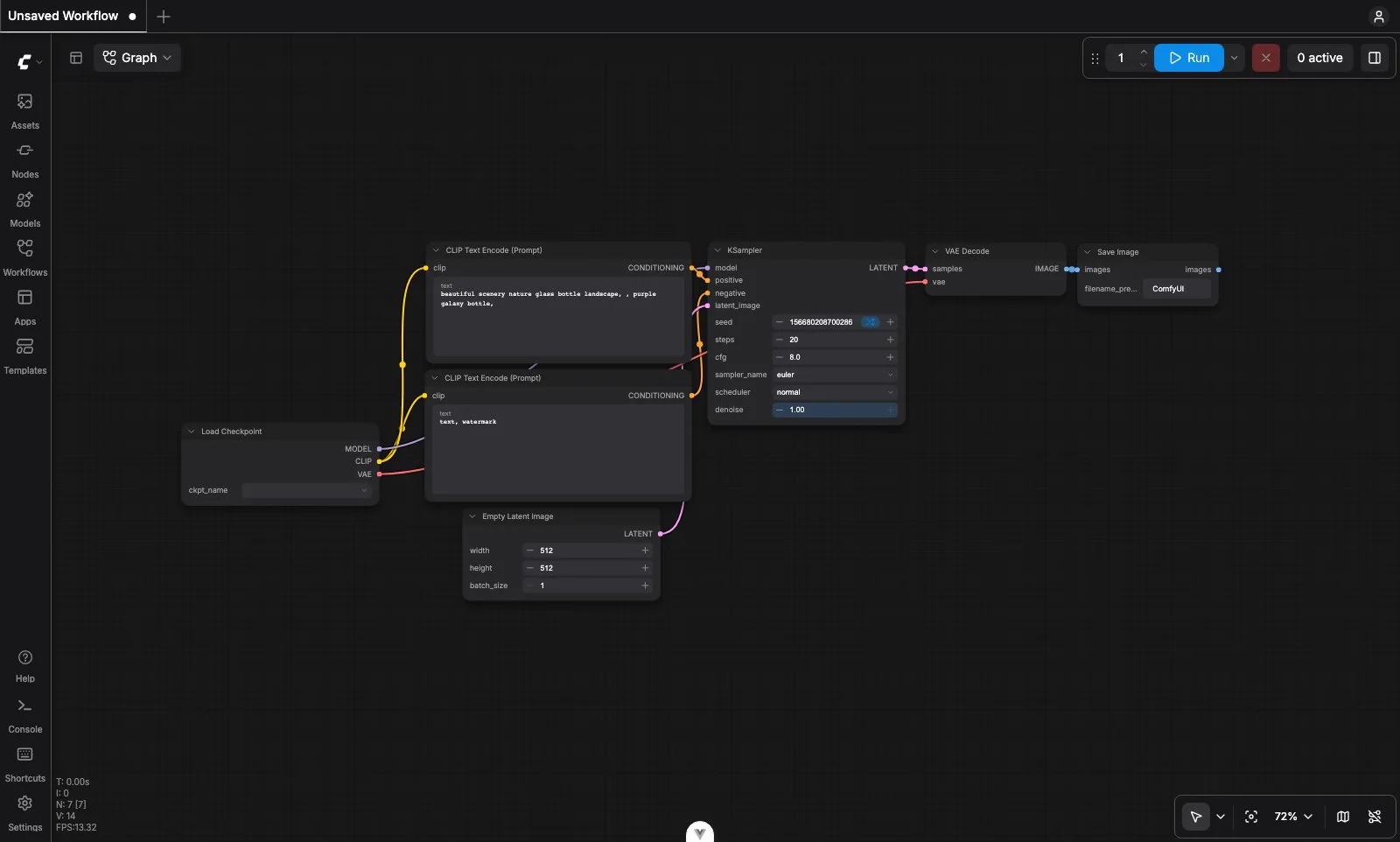
ComfyUI is a visual workflow engine for generative AI, not a single image model. Nodes load models, encode prompts, apply reference or mask controls, sample images, upscale results, and save files. Connecting them makes a multi-step process visible and reusable; changing one step reruns the affected parts rather than rebuilding the whole process.
For games, that can mean exploring environments, varying props, preparing icon candidates, or combining inpainting and background removal. Workflows can be saved as JSON, and supported generated media can carry workflow metadata. The model, inputs, and settings still determine the result: ComfyUI itself does not guarantee a particular art style or a finished game asset.
The open-source core runs locally. Comfy Desktop helps manage installation and environments; Comfy Cloud supplies a browser workspace and hosted GPUs. Partner Nodes call third-party models from the same graph, while the Developer Platform is a separately priced deployment/API offering. These routes have different cost and data boundaries.
Download Desktop or install the open-source core for local use, or enter Comfy Cloud in a browser. Begin with a known template and a small, non-sensitive task; arbitrary community workflows may need extra models or executable custom nodes.
Official workflows and App Mode let you change inputs and inspect results without first writing Python. Model downloads and basic workflow learning may still be needed.
O07O08Combine prompts, reference images, masks, and compatible conditioning nodes. Save useful groups as subgraphs rather than repeating setup.
O01O09Save workflow JSON and outputs, plus model and node versions. The graph records the recipe; it does not bundle every model or guarantee identical pixels on every machine.
O06O12Use your own hardware or Cloud's supported model/node collection. Calling a Partner Node sends its inputs to a remote provider even inside a local workflow.
O04O13O17O19INTERFACE & EXAMPLES
The official interface overview shows how ComfyUI connects individual steps in a visual graph; the model and environment still determine the result.
This page covers pre-generated 2D game-art workflows, access, costs, and production boundaries. It does not rank models or establish animation consistency, engine readiness, or long-running API performance.
Beginner scope: Building or maintaining your own ComfyUI workflow, not merely running a preconfigured template.
Agent scope: Run API-format workflows on an already configured, controlled local instance.
Confidence: learning Medium · Agent Medium
These are independent editorial judgments, not an overall score or a claim of hands-on agent integration testing.
KEY FINDINGS
Reviewed creator accounts show biome concept iteration and a playable project built with original sketches and custom workflows. The latter still planned artist redraws for important assets. These examples support a useful starting point, not an automatic final-art pipeline.
U01U03Historical dependency reports and workflow research identify missing models, version changes, and documentation as recurring work. Desktop isolation and Registry versioning can help; save the environment alongside the graph rather than assuming JSON alone is enough.
O05O12U06U12The official security model treats custom nodes as executable code. A documented 2024 third-party incident illustrates the risk, while current Registry controls reduce rather than eliminate it. Check maintainers and dependencies before installing.
O10O11O12U05EDITORIAL VERDICT
ComfyUI is a useful step when you want more than a prompt box: repeatable steps, visible controls, and reusable batches. Beginners can start from templates without coding, then learn the nodes as their needs grow. Its strongest fit is creators willing to spend some time on workflow and environment maintenance to gain control—not people expecting the graph to replace art direction and final review.
BETTER FIT
POORER FIT
WORKFLOW FIT
Start with an original sketch or reference you may use, vary composition and style in small batches, and preserve the promising workflow.
Generate a clear silhouette, remove the background, refine edges, and compare at the actual in-game display size.
Package the JSON, inputs, chosen outputs, model/node versions, and license notes. A simplified App Mode can expose only the controls teammates need.
RECOMMENDED WORKFLOW
Start from a testable brief, then move through prototyping, assets, audio, testing, and release with an explicit handoff and human check at every step.
SHORTEST RESPONSIBLE PATH
This is a low-risk starting workflow synthesized from the evidence.
Choose one original, non-sensitive prop or icon brief and a model whose license fits your intended use.
Open an official template locally or in Cloud. Check required models, supported nodes, and any displayed charges before running.
Change one input at a time and keep a few candidates plus the workflow JSON; avoid installing unknown nodes just to reproduce a showcase.
Inspect edges, style, and actual display size, then export for further editing. Estimate budget from your own attempts and cleanup—not a generic images-per-dollar promise.
PRICING & RIGHTS
Pricing and terms last checked: Sep 6, 2026
USD list prices checked September 6, 2026. Cloud hours allocate all plan credits to GPU runtime. The two-node example instead allocates credits to remote calls; those budgets cannot be added together.
O13O14O154,200 ÷ 0.266 ÷ 3,600. About $4.56 per included hour if the entire allowance is used that month; image count depends on the actual workflow.
Flux 1.1 Pro Ultra Image at the published $1 = 211 credits conversion. This is one raw call, not a usable game icon.
One Flux call (12.66) plus one Bria removal (3.8). Standard's 4,200 credits theoretically cover 255 such two-call sequences, about $0.0784 each when allocating the subscription. Extra Cloud runtime, retries, and editing are not included.
Divide all actual software, compute, and editing costs by accepted assets. No measured acceptance rate or cleanup time exists for this review, and unused monthly credits also affect your effective cost.
These are alternative budget scenarios and nominal service-call costs, not output-quality forecasts. They exclude tax, discarded candidates, manual cleanup, rights checks, and engine integration. Local generation has no universal per-image price.
Core GPL-3.0 and Desktop's AGPL/commercial license govern software, not blanket output rights. Check every model, LoRA, node, input, and provider license separately. Cloud terms retain customer input/output rights as between Comfy and the customer, but do not guarantee exclusivity, copyrightability, or non-infringement.
Read the linked pricing and terms before paying, especially if you need custom model imports or a particular provider. Subscription credits, credit-to-dollar conversion, and Developer Platform resources are not interchangeable prices.
PRODUCTION RISKS
A shared JSON can still need large model downloads or incompatible custom nodes. Keep working versions and separate experiments from a production environment.
O05O12U06Only install trusted code. The core assumes trusted access to its interface; exposing it to the internet is not an authenticated deployment by default.
O10O11U05Desktop's policy excludes local creative content from its opt-in telemetry, but custom nodes and Partner Nodes can make network requests. Cloud retention and each remote provider's data terms need separate review.
O17O19O20A plausible image can fail at game size, drift between characters, or require redrawing. Budget for selection and editing; low-VRAM anecdotes cannot predict your runtime or final-asset cost.
U01U03U10NOT VERIFIED
RESEARCH METHOD
The research coded 12 independent records across Reddit, GitHub, Hacker News, and an academic paper, with targeted searches of game-development communities. Reddit contributes 5/12, not five separate platforms. This page selects six representative records. Historical bugs and security events are not relabeled as current failures; competitor and helper-tool promotion is downweighted. The assessment is based on public evidence, not first-party generation or performance tests.
Node execution, local operation, workflow files, model support, and the core software license—not a license for every model or output.
Installation and hardware options. Being able to load a model does not establish practical generation speed.
Managed environments, instances, snapshots, and the Desktop AGPL/commercial dual license.
Loading, running, and saving workflows; JSON and supported media metadata do not package every dependency.
Official starting workflows and missing-model information.
A simplified input/output view over a workflow, not a separate image model.
Reusable groups of nodes and their boundaries.
Third-party nodes and dependencies are executable software; use trusted sources.
The trust model, localhost default, and risks of untrusted nodes or exposing the service.
Node versioning, publishing rules, and security controls; registry checks are not a safety guarantee.
Cloud plans, five free runs, model-import limits, credit expiry, and separately priced Developer Platform resources.
0.266 credits per active Cloud GPU second and the published $1 = 211 credits conversion.
Per-call examples for Flux 1.1 Pro Ultra and Bria background removal. Other models and parameters have different rates.
Customer content rights, the scoped no-training commitment, output disclaimers, and third-party services.
Cloud content retention and Partner Node media handling; provider policies remain separate.
Opt-in telemetry and the policy's exclusions for local prompts, workflows, generated media, and model weights.
A February 2025 creator account of staged visual exploration for communication with artists. It does not measure final-asset quality or time saved.
An August 2026 creator used original sketches and custom workflows, while planning artist redraws for important assets. A single self-selected project, not a success-rate sample.
June 2024 reports and code analysis concerning LLMVISION dependencies. A historical third-party incident, not evidence that the current core or Registry is malicious.
A November 2023 update/rollback dependency conflict illustrates maintenance work. It is not treated as a verified current-version bug.
A May 2026 account of running a large checkpoint on a 6GB RTX 2060, with long generation times. One incompletely specified setup, not a hardware benchmark.
Identifies workflow, documentation, and dependency barriers. Authors promote their own helper; we do not adopt its product-effect or user-scale claims.
DISCLOSURE
No affiliate links, sponsorship, vendor account, supplied credits, or technical assistance supported this review. Owner Review passed on September 6, 2026.
This public research review will be revisited when pricing, terms, product versions, or material new evidence changes.