Repository-aware implementation
Search project context, plan a bounded change, edit several files, run commands, and review a diff. The result still needs the game's own build and play loop.
O01O02U04An agentic code editor that can carry a small game from idea to playable changes—with supervision.
PRODUCT OVERVIEW
Cursor is an AI-first code editor with an Agent that searches a repository, edits multiple files, runs terminal commands, reads documentation, and reviews changes. In game development, it can implement gameplay code, UI, data, tools, build fixes, and project structure in Web, Godot, Unity, or Unreal repositories.
It is not limited to the editor. Cursor also offers a headless CLI, Agent Client Protocol support, Python and TypeScript SDKs, a local SDK Bridge, and Cloud Agents with a public-beta API. That makes Cursor unusually composable: another tool can delegate a repository task and collect structured results, subject to authentication, plan, permissions, and model costs.
The code repository is only part of many game engines. Scenes, visual graphs, imported assets, animation state, inspector values, and runtime feel may not be visible in the same way as text files. Cursor can substantially lower the coding barrier, including for people who have not programmed before, but the creator still needs to play the game, describe failures, inspect diffs, and roll back bad changes.
Install the Cursor editor and sign in for interactive work. Paid individual plans add broader Agent use, Cloud Agents, and SDK access. CLI, ACP, SDK, Bridge, and Cloud API paths have their own setup and authentication requirements.
Search project context, plan a bounded change, edit several files, run commands, and review a diff. The result still needs the game's own build and play loop.
O01O02U04Several concrete projects show beginners making small playable games through natural-language iterations. Small steps and visible feedback matter more than pretending code knowledge never becomes useful.
U03U05U06U07Headless CLI, ACP, two SDKs, Bridge, and a Cloud API allow external orchestration. Tool approvals and engine-specific verification remain part of the caller's workflow.
O05O06O07O08O09O10U09U10Text-native Godot and Web projects are often easier to inspect. Unity C# needs an alternative to Microsoft's VS Code-only extension, while visual editor state in Unity and Unreal needs separate attention.
O04U01U02U08INTERFACE & EXAMPLES
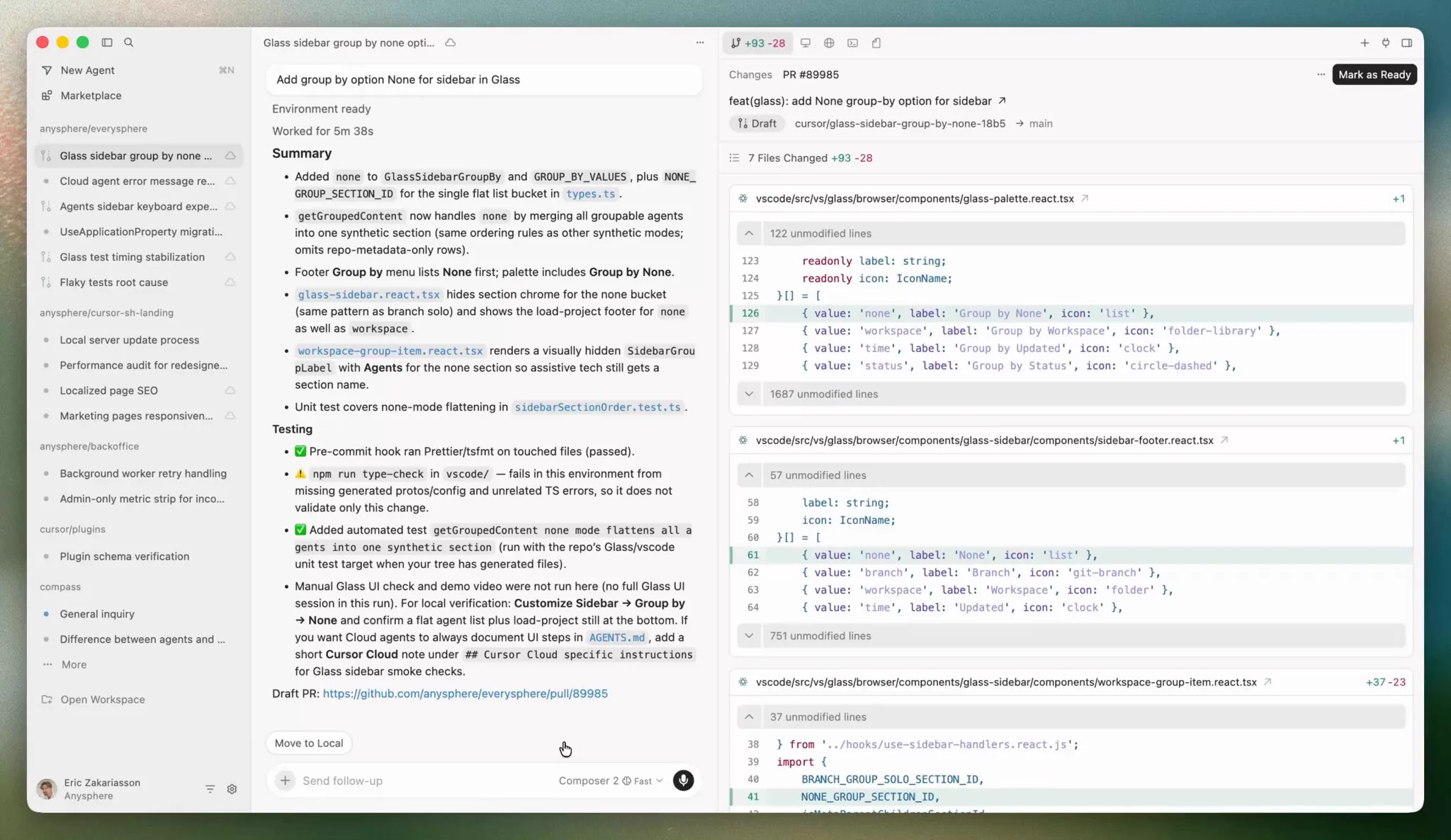
The Cursor 3 demonstration shows an agent list, task summary, and changed files in the same workspace.
Small playable games, bounded features, repository refactors, and debugging across Web, Godot, Unity, and Unreal. This assessment does not promise autonomous completion of a commercial game, reliable visual-editor control, or large-project architecture without experienced review.
Beginner scope: A small, reversible game project or one bounded playable feature, not an unsupervised large commercial production.
Agent scope: Delegate a bounded repository coding task from another agent or application and retrieve its result.
Confidence: learning Medium · Agent Medium
These are independent editorial judgments, not an overall score or a claim of hands-on agent integration testing.
KEY FINDINGS
Beginner Godot cases, a downloadable dungeon crawler, and a hackathon project establish a real possibility. They do not establish a universal success rate, and each still involved iteration, testing, or manual correction.
U03U05U06U07The same evidence that shows fast progress also records broken UI, deleted controls, weak learning, and engine-state mistakes. Plans, diffs, playtesting, and rollback turn those failures into manageable iterations.
O03U01U04U07Unity users value architecture and code help but report scene, UI Toolkit, and asmdef gaps. C# extension licensing also changes setup. Unreal visual state and older IDE integration need their own workflow rather than a generic compatibility claim.
O04U01U02U08Several official non-interactive interfaces expose task execution and results. Public-beta APIs and permission prompts still require bounded automation, but the entry points are documented rather than reverse-engineered.
O05O06O07O08O09O10U09U10EDITORIAL VERDICT
Cursor can genuinely help someone without programming experience make a first playable game. The strongest evidence is not one-shot generation; it is the combination of natural-language changes, a visible repository, fast iterations, and a creator who keeps playing and correcting the result. As projects grow, programming concepts, engine knowledge, Git, tests, and architecture judgment become increasingly valuable. Cursor also earns an easy Agent-integration rating because it exposes several official automation interfaces—not because every game-engine action becomes autonomous.
BETTER FIT
POORER FIT
WORKFLOW FIT
Define a player-visible outcome, let Cursor inspect the relevant files, and review its plan before edits.
Run available builds and automated checks, then open the game or engine and play the changed path.
Inspect the diff and runtime behavior; keep a good change, request a bounded fix, or return to the checkpoint.
RECOMMENDED WORKFLOW
Start from a testable brief, then move through prototyping, assets, audio, testing, and release with an explicit handoff and human check at every step.
SHORTEST RESPONSIBLE PATH
This is a low-risk starting workflow synthesized from the evidence.
Start with a tiny Web or Godot game, or one isolated feature in an existing engine project.
Describe one visible outcome and ask Cursor to inspect first and propose a short plan.
Review the files and plan, create a Git checkpoint, and permit only the commands the task needs.
Apply the change, run the build and checks, then personally play the target path.
Explain the observed failure in concrete terms, iterate once or revert, and only then begin the next feature.
PRICING & RIGHTS
Pricing and terms last checked: Sep 9, 2026
Pro's $20 monthly list price allocated across hypothetical accepted playable changes. This is not observed productivity and excludes on-demand models, tax, engine services, and human work.
O11O12The full subscription is allocated to one accepted result; the real total can be higher.
Only meaningful when those five changes actually pass the game's review.
Not a promise that Pro supplies twenty features or that each change has equal difficulty.
Actual accepted-change cost = subscription, on-demand usage, other services, and human planning, review, playtesting, debugging, and rework divided by accepted changes. The evidence does not supply that complete value.
Cursor's terms assign any Anysphere right in Suggestions to the user, if such rights exist, while users remain responsible for inputs, outputs, third-party rights, and compliance. Generated code is not an infringement, security, or license guarantee.
Check current plan pools and on-demand settings before a long run. A $20 subscription is the payment threshold, not the maximum bill or a fixed feature package.
PRODUCTION RISKS
Code changes can be correct while scenes, inspectors, Blueprint graphs, animation state, or runtime interactions are wrong. Keep the engine and game in the verification loop.
U01U02U07U08A project case records UI misunderstanding and deleted controls. Use checkpoints, inspect diffs, protect unrelated paths, and grant the smallest necessary permission.
O03U04U07Relative plan multiples do not reveal a fixed task count. Long context, retries, expensive models, Cloud runs, and on-demand billing can change the monthly total.
O11O12Privacy Mode changes training use, but documented provider exceptions and cloud retention still matter. Keep secrets out of prompts and review the chosen mode before sending confidential code.
O13O14NOT VERIFIED
RESEARCH METHOD
Ten concrete records were coded across Reddit, Unity Discussions, Cursor Forum, an independent development blog, and Epic Developer Community. Public repositories and downloads corroborate the same project rather than inflating the record count. Official automation documents establish interface availability; user cases establish bounded workflow themes. No ratings, vendor demos, or generic recommendations are converted into success rates.
Official editor setup and first Agent task. A quickstart establishes workflow, not game-project success.
Project search, multi-file editing, terminal, and other Agent tools.
Command approvals, workspace trust, and security boundaries around autonomous actions.
Current C# setup and the licensing boundary around Microsoft's VS Code-only C# extensions.
Non-interactive CLI entry, structured output, authentication, and permission modes for orchestration.
Agent Client Protocol entry for using Cursor through compatible clients and IDEs.
Official programmable task entry for local or cloud execution.
Official TypeScript orchestration and event-stream entry.
Bridge for connecting a separate application to a local Cursor session.
Public-beta Cloud Agent task endpoints. Beta availability does not establish stable production behavior.
Current individual list prices and relative Agent limits, checked September 9, 2026.
Model pools, on-demand use, current model rates, reset behavior, and vendor usage guidance.
Input and suggestion rights, service terms, and user responsibilities. Not legal advice.
Privacy Mode, provider exceptions, cloud retention, and training-use distinctions.
An experienced Unity developer reports strong code and architecture help alongside UI Toolkit, asmdef, and editor-state blind spots.
Multiple setup experiences expose the need for alternative C# extensions and incomplete third-party editor bridges. Counted as one environment record.
One beginner describes building a Godot game by requesting small steps and testing them; the thread also contains more supervised Unity practice.
A separate author uses project documentation, source checks, engine testing, Git, and external backup for each change.
A first-use tic-tac-toe project supports low-barrier prototyping while retaining the limits of a small self-reported case.
A more complete playable project with a public repository and downloadable beta; those attachments support existence, not a universal success rate.
A Godot hackathon walkthrough: substantial Agent contribution, but UI misunderstandings caused destructive changes and the author felt they learned less.
Historical Unreal setup discussion. Useful for environment friction, not current Agent quality.
A concrete external SDK integration record. It supports composability, not game-engine coverage.
A reproducible approval prompt shows that automation can still require human permission at tool boundaries.
DISCLOSURE
Independent editorial research. MakeGameWithAI has no affiliate link, sponsorship, vendor account, credits, or technical support for this review. Owner Review approved the positioning, beginner-friendly / medium decision, and easy Agent integration / medium decision on September 9, 2026, then approved publication on September 14, 2026.
This public research review will be revisited when pricing, terms, product versions, or material new evidence changes.