Describe an icon and get SVG candidates
Choose Vector in Create, describe the subject, and set the style, colors, and frame. The output is an editable vector candidate, not just a flattened preview.
O01O02O22Turn an idea into game icons you can keep editing—even without drawing skills.
PRODUCT OVERVIEW
Recraft Studio is an AI visual-creation workspace in your browser. Describe an object or provide an image you have permission to use, choose a model, style, and colors, then generate candidates on a canvas. For games, that can mean inventory items, ability markers, resource symbols, button artwork, or static interface illustrations. You can begin by describing and choosing, without drawing the original yourself.
Its distinguishing workflow is the ability to keep working on the graphic: generate an editable SVG, convert an existing raster image to vectors, adjust shapes and fills, or export a raster illustration. These are different routes, not interchangeable quality guarantees. The wider platform also has Mockup, video, and an agentic Chat mode; this page focuses on icons and static artwork. A picture of a button does not include its interaction, states, or game logic.
Create an account and work in Studio. The current interface places Create and Chat in one left panel; select the model explicitly when following a budget. API and Figma are optional, separately scoped routes. Old Exploration and variation tutorials do not describe every current control.
Choose Vector in Create, describe the subject, and set the style, colors, and frame. The output is an editable vector candidate, not just a flattened preview.
O01O02O22Raster generation is another route for painted or textured artwork. Background tools help prepare cutouts; a 3D-looking illustration is still an image, not a mesh.
O01O09The Vector Editor works with generated and imported SVGs. Adjust paths, curves, and fills directly; a small correction does not always need another AI conversation.
O06O20Vectorize turns an authorized PNG/JPG into SVG. Conversion and color reduction can help, but complex textures may introduce artifacts and require path cleanup.
O07Reuse styles, references, palettes, and settings. Image set supports up to six subject prompts where available. Matching parameters helps organize a set, but does not guarantee equal line weight or detail.
O04O05O22Export vector or raster files and continue in your design tool or game project. A Figma plugin is available, but neither a plugin nor an SVG file is a finished Unity, Unreal, or Godot UI component.
O08O19INTERFACE & EXAMPLES
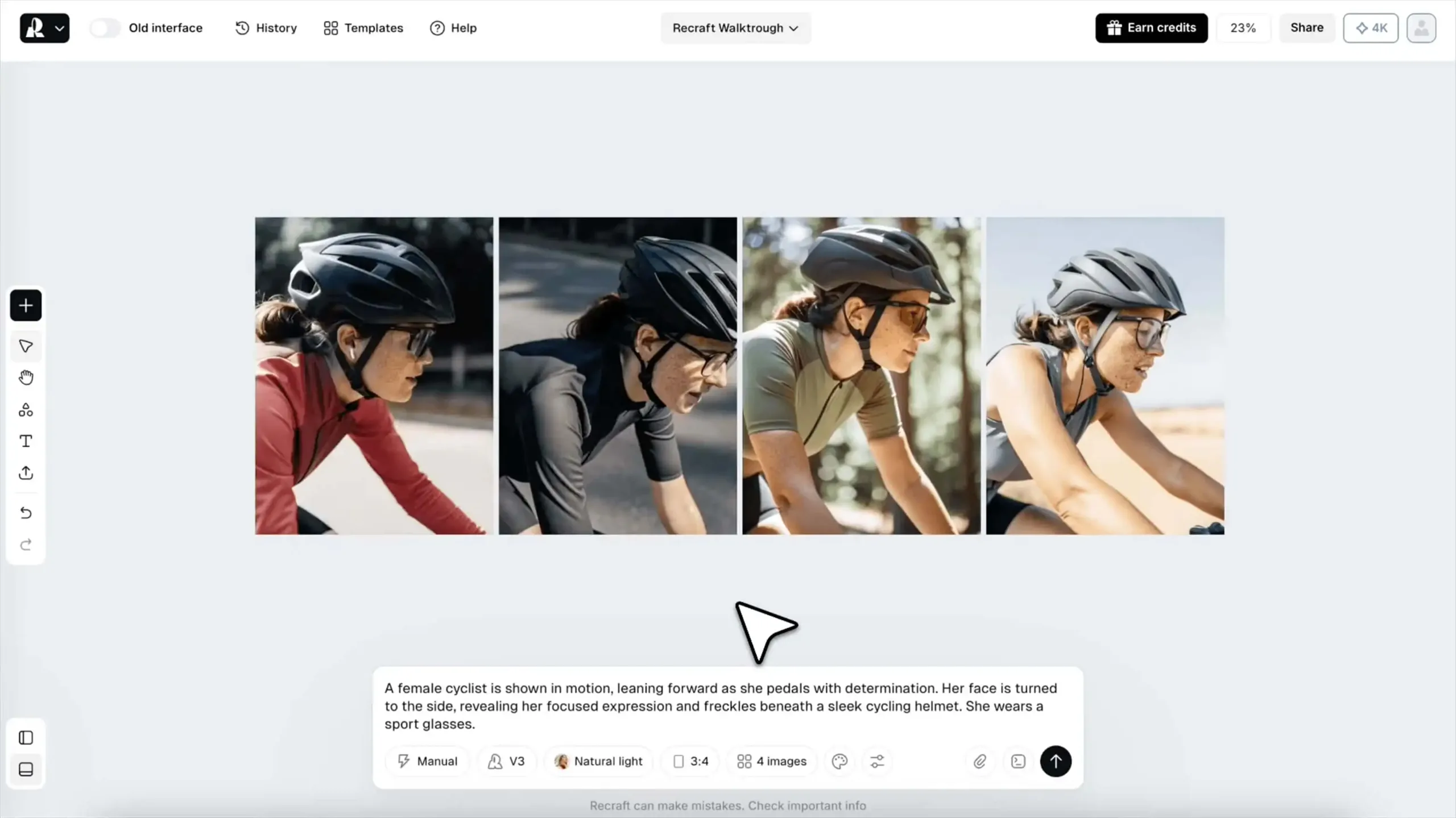
The official Studio walkthrough poster shows generated variants on a canvas with the prompt controls below.
Pre-generated game icons and static UI artwork: entry routes, editable files, candidate budgets, and usage conditions. Current V4.1/V4 Styles set quality, accepted-asset cost, and engine delivery remain unverified.
Beginner scope: A single icon, illustration or vector asset in the web app.
Agent scope: Generate or edit raster/vector images and retrieve their URLs.
Confidence: learning Medium · Agent Medium
These are independent editorial judgments, not an overall score or a claim of hands-on agent integration testing.
KEY FINDINGS
The first useful task can be describing a potion, shield, or resource icon and choosing between visible candidates. Learning line weight, spacing, and small-size readability improves control later. We would not limit Recraft to people who could already draw the same artwork manually.
O02O06Simon Willison's V3 example exports SVG and edits paths; Jordan King's icon brief documents generation, palette choices, and selection. These are historical or model-unknown creation records, not current-version quality tests. Neither proves that every exported path is clean or every beginner gets the same result.
U01U02Specific reports describe transparent-edge artifacts and repeated conversational edits. Shared styles and manual vector editing offer controls, but a coherent set also needs judgment. The recent V4 Styles release has no confirmed complete game-icon acceptance record in this research; older complaints are not automatically current defects.
O04O06O20U03U04U05EDITORIAL VERDICT
Recraft is worth considering when your game needs its first personalized icons or static interface artwork, especially if you want graphics you can keep editing. Start from text, pick a direction, then improve the useful candidates. Drawing and design knowledge raise the ceiling, but are not a prerequisite. We would budget for selection and cleanup rather than treat either a successful generation or an SVG export as the finished set.
BETTER FIT
POORER FIT
WORKFLOW FIT
List subjects, where they appear, their screen size, and a shared palette. Start with a few icons before committing to a larger set.
Fix the model and style, compare candidates together, then adjust selected SVG colors or paths. Use new generations for new directions, not automatically for every small correction.
Match spacing and scale, inspect light and dark backgrounds, and check legibility at the intended display size. Export the files and implement interaction and states separately.
RECOMMENDED WORKFLOW
Start from a testable brief, then move through prototyping, assets, audio, testing, and release with an explicit handoff and human check at every step.
SHORTEST RESPONSIBLE PATH
This is a low-risk starting workflow synthesized from the evidence.
Choose three subjects such as a coin, potion, and shield. Define a shared frame, palette, and display size.
Start with a text brief in Create → Vector and an explicit model. Free is for personal exploration; verify paid-generation rights before making commercial assets.
Generate a few options, compare them side by side, and save the useful settings. Do not assume a shared style guarantees a matched set.
Try targeted manual color or path edits. Check the cost before adding Chat, more generations, or background processing.
Export and inspect the icons in context. Record actual payment, cleanup time, and accepted count before scaling to twelve or more subjects.
PRICING & RIGHTS
Pricing and terms last checked: Aug 31, 2026
Basic monthly: $12 ÷ 1,000 credits = $0.012/credit. Fix Studio to V4.1 Vector in Create, at 4 credits per image, without Chat, Auto, style-test generations, or external models. These are nominal allocations when the subscription is used, not retail prices per finished asset.
O07O10O11O12O13O14O15O18O23O24One model output, before selection and refinement. Generating one Utility raster image and then vectorizing it is a different workflow, not the same SVG quality for a lower price.
12 × 4 credits. These are twelve raw candidates, not a guarantee of twelve matching, accepted game icons.
12 × 3 × 4 credits = 36 candidates. Three options is a planned choice budget, not an observed one-in-three acceptance rate.
36 initial candidates + one more for each of six subjects = 42 × 4 credits. Reserve 12 × 1 credit for background removal: 144 + 24 + 12 = 180. Skip unnecessary removal; additional edits cost extra. Accepted quantity and cleanup time are unknown.
1,000 ÷ 4 = 250 raw images; alternatively, floor(1,000 ÷ 180) = 5 fuller workflows, with 100 credits left. Do not add these capacities together. Neither means five accepted icon sets.
If you buy Basic only for this task and really accept twelve icons, software cash cost is $12 ÷ 12 = $1 each, plus labor. This is hypothetical, not a measured outcome. The $2.16 allocation does not let you buy a finished set for $2.16.
Actual accepted-asset cost = software payment allocated to the task + top-ups + other tools + cleanup labor, divided by distinct accepted assets. Rejected candidates still consume the allowance. Manual edits and exports have no separate charge listed in the reviewed table, but labor and plan permissions still matter. No finite per-accepted-asset price can be calculated if none are accepted.
Current Free-plan outputs are public and not licensed for commercial use. Assets generated during a paid subscription carry commercial rights and remain private after cancellation, subject to the terms. Do not assume upgrading retrospectively licenses earlier free outputs. Inputs still need appropriate rights, and Recraft outputs may not be used to train AI models. Paid ownership is not a guarantee of exclusive copyright or non-infringement.
Refunds are discretionary and subject to the current FAQ and applicable law. Do not assume rejected images or an unfinished Agent task will restore credits. Keep generation dates, plan details, and source permissions, and check the estimate before changing models or entry modes.
PRODUCTION RISKS
Official help includes Free and individual paid accounts in training by default, while Teams defaults out. Its general opt-out wording conflicts with a FAQ that excludes Free and names Pro, leaving Basic unclear. Confirm your actual controls or obtain written clarification before uploading confidential artwork; opting out concerns future content.
O15O16O17A 2D-game user reported halos and missing pixels around cutouts; official background docs also describe processing limits. Check light and dark backgrounds, small sizes, and the whole icon set. One report establishes a useful check, not the failure rate of every current image or vector.
O09U03A Chat request may use multiple paid steps and still need revision. Compare it with the manual Vector Editor for path or fill changes. Earlier complaints predate different interface updates; they do not establish that today's manual editor cannot perform the task.
O06O12O20U04U05API inputs and outputs are excluded from Recraft model training, but Developer Terms also cover storage options and caching/content-library restrictions. That is not blanket zero retention or permission for an unrestricted permanent asset database. Clarify your intended use before investing in automation.
O17O18NOT VERIFIED
RESEARCH METHOD
The research checked 28 official sources; this page selects 22 and links all 6 concrete usage records across 5 platforms: a personal developer blog, LinkedIn, Recraft Canny, Trustpilot, and Tom's Guide. Trustpilot contributes 2 of 6 (33.3%). Vendor-hosted Canny and the media site's affiliate disclosure are explicit; excluding Canny leaves 5 records across 4 platforms. Historical V3 cases and unknown model versions cannot establish current V4 Styles quality. GameDev.net and relevant engine/art communities were searched without qualified cases; unreadable G2 reviews, automated Reddit recommendations, and repeated promotional cases were excluded. This is not a representative satisfaction sample.
The model families and raster/vector capabilities. Vendor quality claims are not independent comparisons.
The account, canvas, prompt, editing, and export route; documentation, not a first-party usage test.
Distinguishes alternatives for one prompt from an image set of up to six subjects. Model and plan access can differ.
Reference images, raster/vector styles, palettes, and previews; shared settings do not prove set-wide consistency.
Manual shape, node, curve, and fill editing for generated or imported vectors.
Raster-to-SVG conversion and color reduction, including possible artifacts with complex textures.
File formats, dimensions, and vector export. Exported artwork is not an implemented game UI component.
Transparency processing and possible resizing, edge, and quality limitations.
The Basic and Pro help-page prices used below. These are not verified account-specific checkout quotes.
Current rights, cancellation, refunds, and credit FAQ. Plan-price cards did not appear in the retrieved public text.
Per-image model rates, editing operations, Chat charges, expiration, and top-up pack prices; separate from API Units.
Programmatic generation and processing prices. An API budget excludes subscription credits and integration labor.
Free versus paid generation rights, existing paid assets after cancellation, and the ban on training AI with outputs.
Effective August 11 for new users and August 25 for existing users; payment, asset rights, training, and input responsibilities.
Content processing, providers, retention, and training context. Read with current terms and account controls.
Personal accounts are included by default. General opt-out wording conflicts with the Free/Pro FAQ; Basic is not clarified.
Separate API/MCP billing and rights; storage options and section 3.6 caching/content-library restrictions need care in asset pipelines.
Figma integration with Recraft accounts and credits. The listed plugin models are not a guarantee of full Web-model parity.
July 23 Vector Editor, August 21 interface update, and August 27 V4 Styles announcements; not output-quality tests.
Create/Chat, Vector and Image set, selected-object edits, and controls moved or unavailable after the redesign.
Style/reference requirements and separately billed style creation. Do not use these API rates as Studio prices.
Limited credits, up to three uploaded images per day, and two images per prompt. No current daily credit number is specified.
A historical V3 record with an SVG export, Pixelmator edits, and an API example. We read the account, not reran it; no current-model quality inference.
A specific icon brief, palette, generations, and selection. The latest page shows 8mo; model, plan, exact date, and any vendor relationship are unverified. Reported batch spending lacks a usable denominator.
A user report with attached examples of halos or missing edge pixels. Model and plan are unknown; vendor-hosted feedback, not a confirmed current defect or fix.
Reference-based stars and edits allegedly changed the design. Unknown model/plan; predates the July 23 manual editor. Located by author, title, and date on the shared review list.
August 1 experience: the author reports five Chat prompts to merge two anchors into a point. No bill or complete session; not an average retry count. Same platform as U04.
Christoph Schwaiger's historical V3 walkthrough found an accessible start but missed room edits. The site discloses affiliate links; downweighted, not a current vector benchmark.
DISCLOSURE
This review used no affiliate links, sponsorship, vendor account or credits, or technical support. Third-party commercial relationships are labeled where known. Owner Review passed on August 31, 2026. We did not register, upload artwork, generate images, or run a game-engine integration for this review.
This public research review will be revisited when pricing, terms, product versions, or material new evidence changes.