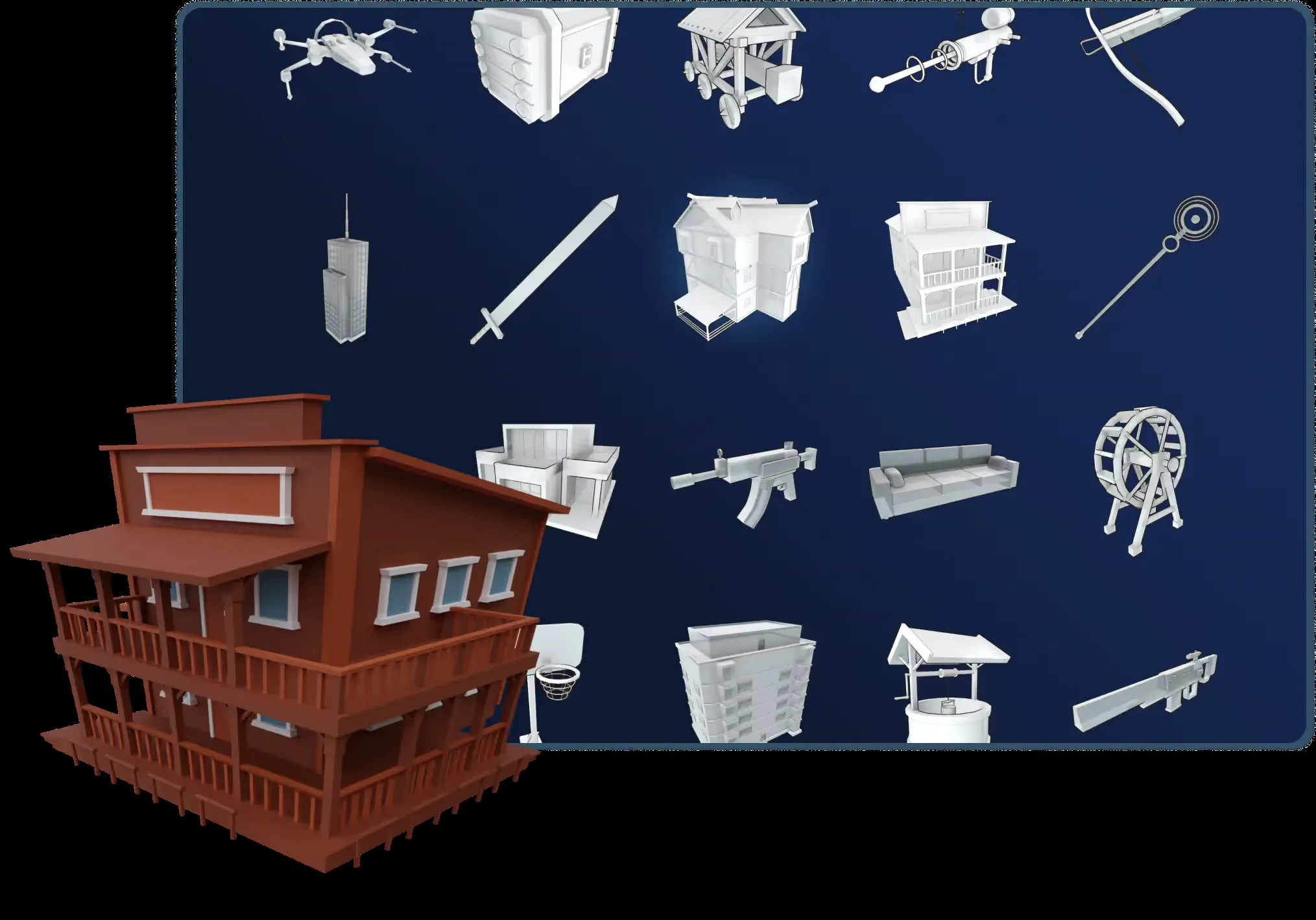
Adjustable templates
Start with a supported object category and vary its shape, proportions, or parts. Template controls and LOD features do not apply to every AI mesh.
O02Adjust a 3D template—or generate a model from text and images.
PRODUCT OVERVIEW
Sloyd is a browser-based 3D creation workspace with two different starting points. Its human-made parametric templates let you adjust dimensions, proportions, and parts with sliders and switches. Text- and image-to-3D generation instead creates a mesh from an object description or reference image, giving you options outside the template collection.
Those routes have different editing rules. A template remains adjustable within its designed controls; an AI-generated mesh cannot be reshaped with those same template sliders. You can retexture it, split it into parts, or export it for geometry work in another application. The workspace also includes image tools, skyboxes, and humanoid rigging and animation.
For a game creator without modeling experience, this provides a way to make and inspect prop, building, or environment candidates. Common 3D formats and bridge plugins help move them onward, but materials, scale, polygon budgets, rigging, and performance still need project-specific checks. A separate API serves programmatic 3D generation with its own balance and terms.
Use the Web App to customize a template or preview a generated object. Guest is primarily a preview/community-download entry; exporting a newly generated model requires a paid plan. API access and credits are purchased separately.
Start with a supported object category and vary its shape, proportions, or parts. Template controls and LOD features do not apply to every AI mesh.
O02Generate an object from a description or reference. Multi-image uses two to four consistent views; thin structures, reflective surfaces, and inconsistent references can be difficult.
O03O04O05Change surface appearance, split a mesh, or use humanoid rigging and motion tools. Retexturing does not fix geometry, and splitting does not create game interactions.
O06O07O08Move models through GLB, FBX, or OBJ and supported software bridges. Free plugin downloads do not remove paid export requirements or establish runtime generation.
O11O12O16INTERFACE & EXAMPLES
Sloyd's template showcase includes buildings, furniture, and props, illustrating its parametric asset route.
Pre-generated props and environment-asset candidates, their editing/export routes, and cost and rights boundaries. No claim of zero-cleanup engine use, reliable hero-character rigs, or private production API delivery.
Beginner scope: One prop or prototype model in the web app.
Agent scope: Generate one 3D candidate through the API and retrieve its GLB.
Confidence: learning Medium · Agent Medium
These are independent editorial judgments, not an overall score or a claim of hands-on agent integration testing.
KEY FINDINGS
The official product separates adjustable templates from generative meshes. A historical template user valued the control within prebuilt elements; another user wanted geometry changes that retexturing could not supply. Pick the route based on what you need to change later.
O02O03O06U02U04A documented walkthrough shows a treasure-chest prompt, generated preview, and wireframe. It does not demonstrate completed export and discloses affiliate income. The current plan table and a separate user account make the preview/download distinction important before spending time generating.
O16U03U05Plus includes unlimited non-Ultra base generation and other base tools, alongside 50 monthly credits for tasks such as splitting and generated motion. Those credits measure specific advanced operations, not every use of the workspace. Fair-use and queue limits still apply.
O07O08O16Official export guidance notes material-packaging issues. A historical simulator project also records GLB optimization and Blender material renaming after using Sloyd models. These sources support external workflow use, without establishing today's cleanup time or automatic engine compatibility.
O11O12U06EDITORIAL VERDICT
Sloyd is worth considering when you want an approachable start for 3D props and environment assets: controlled variations from templates, or broader exploration through generation. You do not need to learn manual modeling before trying it. Its distinctive offer is adjustable templates alongside unlimited base generation on paid plans—not a proven quality win over Meshy or Tripo. Choose it with the editing limits and export paywall understood.
BETTER FIT
POORER FIT
WORKFLOW FIT
Choose a suitable template, vary its controls, then export and check the set in your scene.
Generate from an original description or image, retexture if useful, split the model, and inspect the exported pieces.
Use an appropriate humanoid pose, apply rigging and a preset or generated motion, then export for animation review.
RECOMMENDED WORKFLOW
Start from a testable brief, then move through prototyping, assets, audio, testing, and release with an explicit handoff and human check at every step.
SHORTEST RESPONSIBLE PATH
This is a low-risk starting workflow synthesized from the evidence.
Pick a non-sensitive prop brief and decide whether template controls or an original generated shape fit better.
Use the Guest preview to inspect the object from several angles. Use original references and check the current export and commercial plan before upgrading.
Start with a base generation rather than assuming premium features are necessary. If you specifically need Plus multi-image, video motion, or 4K generation, confirm the conflicting entitlement first.
Export a small candidate, inspect scale, geometry, materials, and any animation in the target workflow, and keep a record of paid attempts and manual cleanup.
PRICING & RIGHTS
Pricing and terms last checked: Sep 6, 2026
USD list prices checked September 6, 2026. Web examples allocate the entire monthly subscription across premium credits; they are not extra cash charges or top-up prices. Each allowance example is an alternative scenario. API uses its own $1 = 75 credits rate.
O05O07O16O21O22O26These non-Ultra base steps do not consume the monthly premium allowance. You pay for access, not a guaranteed count of accepted assets; zero extra premium credits is not zero total cost.
floor(50 ÷ 20) = 2, with 10 credits left. $15 ÷ 50 × 20 = $6 per sequence. This does not add $6 to your bill; the subscription also includes base tools. Cleanup is extra work.
20 + 20 credits per sequence; floor(350 ÷ 40) = 8, with 30 left. $50 ÷ 350 × 40 ≈ $5.71 allocated. Pro avoids the Plus multi-image entitlement conflict, not output uncertainty.
20 ÷ 75 ≈ $0.267; 900 ÷ 20 = 45. Upload a reference, request a model, poll, and download GLB. The disclosed generation/upload charge excludes hosting, manual cleanup, engine work, and commercial-license confirmation.
Theoretical task counts assume no other credit use, retries, or discarded paid candidates. Actual accepted-asset cost is unknown: divide all actual software, service, and manual-work costs by the accepted count. Web subscriptions and API balances, entitlements, and refund rules must never be merged.
For Web App models, Guest is personal use; Plus and Pro permit commercial game use within the terms, while asset-store/stock-media redistribution requires Pro. This is a non-exclusive usage license, not an infringement guarantee. Commercial 3D printing requires separate permission, and references containing third-party copyrighted content are restricted. The Web App license does not establish the separate API's commercial or redistribution rights.
Check the exact plan and terms before paying. A free plugin is not a free export, paid generation is not automatic rights clearance, and a failed-job credit refund is not a cash-refund promise.
PRODUCTION RISKS
Retexturing cannot reshape a mesh. Thin features, materials, humanoid deformation, pivots, and collision may need external work; a Low Poly preset is not a project performance budget.
O03O04O06O08O11U02U06Plus multi-image/video-motion and 4K generation statements differ across official pages. Web top-up and failure rules remain incomplete. Verify the feature that motivates the purchase rather than assuming every advanced tool is included.
O04O05O10O16API GLB results use public download URLs without authentication. The reviewed policies do not fully specify every generation provider's training and retention behavior. Avoid confidential inputs without appropriate terms.
O19O24Only the public 3D API is confirmed here. Other advertised API families remain coming soon, and the current Web App licensing definition does not resolve API commercial and resale terms.
O18O23O24NOT VERIFIED
RESEARCH METHOD
Six independent records were coded across Trustpilot, Reddit, Unite.AI, and GitHub after checking twelve platforms. Trustpilot contributes 3/6; newer experience is more concentrated there. The 2025 template comment and 2024 integration project retain historical scope. The affiliate walkthrough is downweighted, and inaccessible Capterra text is excluded. This supports a bounded directory description, not a market-wide quality consensus or a first-party test.
The browser workspace and its 3D, texture, animation, image, and environment tools. Marketing quality claims are not independent evidence.
Parametric templates, sliders, toggles, and model variations. These controls are not a general editor for AI-generated meshes.
Object generation, presets, export, and limitations. Preset polygon counts are not game-performance guarantees.
Reference-image requirements, output limits, and a 4K entitlement statement that differs from the pricing page.
Two to four consistent views and a Pro-only label that conflicts with the current Plus pricing list.
Changing surface appearance and editing textures, not reshaping geometry.
Splitting a model into submeshes and the 20-credit task cost.
Humanoid rigging, preset and generated motion, and baked animation export; not a guarantee of game-controller compatibility.
The 30-credit video-motion task and a Pro label that conflicts with the Plus pricing list.
Formats and texture packaging, including FBX material handoff caveats.
Bridges from the Web App to engines and DCC tools. Plugin access is distinct from runtime generation and from free model export.
Guest, Plus, Pro, monthly versus annual billing, unlimited base tools, premium credits, and plan rights.
Web App model use, asset-store redistribution, input restrictions, refunds, and the separate commercial 3D-printing boundary.
Data-processing and retention context; it does not fully establish training and retention rules for every generation provider.
A separate 75-credits-per-dollar API tariff, base generation charges, and optional parameter surcharges.
The $12 minimum purchase, failure-credit refunds, balance rules, optional recharge, and Ultra billing setup.
Public 3D API availability; other product families marked as coming soon are not treated as usable public endpoints.
Job polling and GLB delivery through a public download URL without authentication.
3D request parameters and the separately listed zero-credit image-upload step.
Describes using skyboxes and art tools in a personal workflow. Read on the company review page; plan and commercial relationship are unknown, and a shipped game was not verified.
A July 1 experience reporting inaccurate output, inability to reshape the mesh, and stalled retexturing. A specific user report, not a current failure-rate estimate.
A March 24 experience discovering that downloading a newly generated model required payment. The current pricing page is the authority for today's export rules.
Describes control within combinations of prebuilt elements after trying the tool. Historical template experience, not evidence about current AI-generation quality.
Janine Heinrichs shows prompt, generation, preview, and wireframe. The article discloses affiliate income and does not demonstrate a completed export; its template/AI conflation and rankings are not adopted.
Historical project documentation records GLB optimization, React Three Fiber use, and Blender material renaming. It illustrates downstream work, not current plugin or generation performance.
DISCLOSURE
No affiliate links, sponsorship, vendor account, supplied credits, or technical assistance supported this review. The Unite.AI source discloses affiliate income and is identified as such. Owner Review passed on September 6, 2026.
This public research review will be revisited when pricing, terms, product versions, or material new evidence changes.