Agent or manual generation
Start in conversation and let Layer select a route, or choose the model, references, dimensions and batch size yourself in the generation form.
O02O03O04Generate, organize and automate game-art candidates in one cloud workspace.
PRODUCT OVERVIEW
Layer is a cloud creative workspace for game and entertainment teams. In its current Agent-first app, you can describe an asset in plain language, let the assistant choose a model and settings, compare results on a visual board, refine them and keep the useful files in a shared library. A separate generation form exposes model, reference, size and batch controls when you want to make those decisions yourself.
The product is broader than a single image generator. Projects group related sessions and assets; Reference Sets collect reusable character, object, environment or style material; optional LoRA training can turn a curated set into a custom model; Workflows chain multiple generation or processing steps. Reference-guided generation and custom training are different paths—a first candidate does not require training.
Layer currently exposes image, video, 3D and audio models, plus playable-ad and marketing workflows. This review makes a narrower decision about pre-generated 2D concepts, props, icons and related variants. PNG, JPEG and single-layer PSD export are delivery paths, not proof that transparency, pixel alignment, animation consistency or game-engine import already meet a project's standard.
The same workspace can be reached programmatically. Layer's official remote MCP documents OAuth setup for Codex, Claude Code, Cursor and other clients; the REST API uses a Personal Access Token. Both can estimate a task, submit it, poll status and retrieve results while drawing from the workspace's Creative Units.
Create a Layer account and workspace, then obtain or buy enough Creative Units. Free describes an account without an active subscription; it does not establish an unlimited free generation allowance. MCP uses workspace OAuth, while REST tokens inherit account permissions and belong only in a trusted environment.
Start in conversation and let Layer select a route, or choose the model, references, dimensions and batch size yourself in the generation form.
O02O03O04Projects, the asset library and Reference Sets keep related outputs and approved visual material together. They reduce repeated setup; they do not guarantee character or style consistency.
O06O08Curated references can become LoRA training data, while node-based workflows can repeat multi-step processing. Both add preparation, review and CU costs beyond a first image.
O07O17Remote MCP and REST cover discovery, estimates, asynchronous execution, status and results. The caller still needs authorization, a budget and human acceptance criteria.
O16O17O18O19O20INTERFACE & EXAMPLES
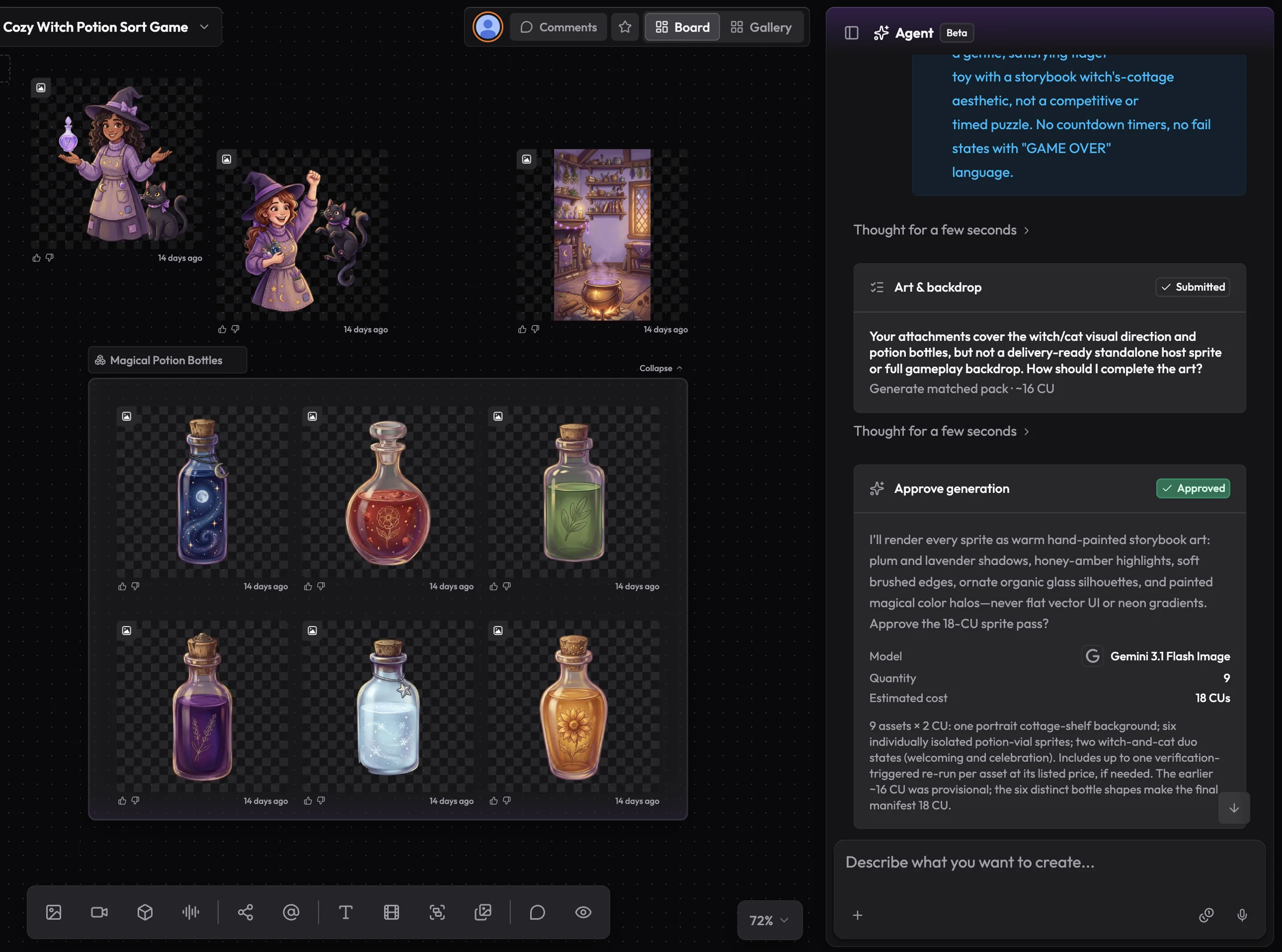
Layer's official example shows the Agent alongside a board of character, backdrop, and potion assets. It is a vendor example, not a typical output claim.
A solo developer or small team exploring non-confidential 2D game-art candidates and optionally making that task callable from an external development agent. Current video, 3D, audio, playable-ad quality and production-scale SLA are outside this conclusion.
Beginner scope: A browser user's first non-confidential 2D prop or icon candidate and export, excluding custom training and production delivery.
Agent scope: An external development agent generates a bounded 2D asset batch, polls the returned run and retrieves files; not autonomous approval or an entire game-art pipeline.
Confidence: learning Low · Agent Medium
These are independent editorial judgments, not an overall score or a claim of hands-on agent integration testing.
KEY FINDINGS
Layer combines model access with a board, projects, an asset library, Reference Sets, optional training and repeatable workflows. That can matter when a project produces many related candidates; it adds less value to a one-off image request.
O02O06O07O08The documented first-asset path does not require a local GPU, node graph or custom training. Two positive records describe older versions, while a current reviewer did not complete a first image. That is enough to describe the path, not enough to label today's onboarding easy or difficult.
O03O04U01U02U03The historical walkthrough reached multiple chest candidates and transparent export, but repeated local edits still missed the requested effect. Current tools have changed, so this supports a review checkpoint—not a current failure-rate claim.
U01MCP and REST expose workspace/model discovery, cost estimates, execution, status and result retrieval. An estimate must use the same parameters as execution; explicit batch size and budget limits prevent an agent from silently multiplying spend.
O16O17O18O19O20Current tariffs support a reproducible CU budget, but the evidence provides no current acceptance rate, retry distribution or cleanup time. A successful paid output that you discard still consumes the allowance.
O09O10O11EDITORIAL VERDICT
Layer is worth considering when the real need is not merely one generated image, but a shared place to compare models, reuse game references, organize candidates and let a coding agent request assets. The official MCP/API path is unusually complete for this category. The weaker part of the evidence is the human experience: current independent reports do not establish easy onboarding, reliable style consistency or production-ready output. Begin with one bounded, non-confidential asset task and judge accepted files—not the number of generations.
BETTER FIT
POORER FIT
WORKFLOW FIT
Choose one prop or icon, write its intended game use, dimensions and visual constraints, then generate a bounded number of options with either the Agent or form.
Compare the candidates together, select one, make only the edits the task needs and inspect the exported PNG, JPEG or PSD at its actual game size.
Connect the official MCP or REST route, discover the exact model, estimate with explicit batch parameters, execute once, poll the returned ID and save accepted results with their cost metadata.
RECOMMENDED WORKFLOW
Start from a testable brief, then move through prototyping, assets, audio, testing, and release with an explicit handoff and human check at every step.
SHORTEST RESPONSIBLE PATH
This is a low-risk starting workflow synthesized from the evidence.
Pick one non-confidential prop or icon and define its target size, background, palette and acceptance checks.
Create an account, inspect the available CU balance and checkout conditions, and set a cash/CU limit before generating.
Use an existing model first. Generate a small explicit batch; do not treat custom training as an entry requirement.
Select, refine and export one candidate. Check edges, scale, readability and file behavior in the real game context.
Record payment, CU consumed, discarded outputs and cleanup time. Connect MCP/API only when the brief and approval rules are stable.
PRICING & RIGHTS
Pricing and terms last checked: Sep 22, 2026
Entry subscription allocation: $10 ÷ 300 CU = $0.033333… per CU. Fix the example to Seedream 4.0 at 1.2 CU per candidate and one separate 0.3-CU background-removal pass. These are nominal allocations inside the subscription, not separately purchasable finished-asset prices.
O09O10O11O18One successful model output before selection, correction or game-context checks. The cash entry remains the $10 subscription; Layer does not sell this candidate separately for four cents.
4 × 1.2 + 0.3 = 5.1 CU. Four options are a planned choice budget, not an observed 25% acceptance rate. Extra edits, upscales or training consume more.
floor(300 ÷ 1.2) = 250 single candidates. Alternatively, floor(300 ÷ 5.1) = 58 four-option workflows with 4.2 CU left. Do not add the two capacities together, and neither number is an accepted-asset count.
If the subscription is bought only for this task, cash paid is still $10 before tax, even when the chosen workflow allocates only $0.17. Actual cost also includes discarded successful outputs, cleanup, other tools and labor, divided by distinct accepted assets.
The model tariff and plan entry were rechecked on September 22, 2026. Accepted count, retry distribution and cleanup time remain unknown; if nothing passes review, no finite cost per accepted asset exists. Confirm the live estimate and checkout terms before spending.
Layer grants access for lawful personal and commercial purposes. Subject to payment, input rights, applicable law and third-party model terms, Layer assigns whatever rights it has in generated content to the customer. Outputs may be similar to other users' results; this is not a promise of exclusivity, copyright eligibility or non-infringement.
The Terms say one-time CU do not expire and describe 10% rollover, while help articles say top-ups expire at cycle end and contain both no-rollover and up-to-10% language. Cancellation wording also differs. Do not stockpile units or depend on a cancellation date until the checkout/order terms that apply to your workspace are clear.
PRODUCTION RISKS
Rollover, top-up expiry and cancellation notice cannot be reduced to one reliable sentence from the public material. Keep a screenshot or written confirmation of the terms shown to the purchasing workspace.
O10O11O13The current independent set is too small and too old to establish style consistency, precise editing reliability or production acceptance rates. Review transparency, scale, anatomy, text, repeated characters and the full set in context.
U01U02U03The Terms restrict training on customer inputs except customer-specific workspace improvements, but Layer and directly involved third-party providers still receive licenses needed to process, store and provide the service. Confidential IP needs the applicable plan, controls and contract review.
O13O15Forge defaults and model settings can create batches. Estimate with exact parameters, set a task ceiling, poll the returned run instead of resubmitting and require human approval before training or scale changes.
O16O18O19NOT VERIFIED
RESEARCH METHOD
We refreshed 20 official product, help, pricing, legal and developer sources. Thirteen independent environments were searched in the underlying research; three concrete usage records were retained across an independent design blog, G2 and Trustpilot, plus one community technical repository kept separately. Reddit, GameDev.net, Unity Discussions, Epic forums, Polycount, Blender Artists, Product Hunt, Hacker News and ArtStation did not add a qualified current-use case. Two retained records concern older versions, while the current Trustpilot record is a failed onboarding attempt rather than an output review. This is sufficient for a bounded product, cost and interface page—not a representative satisfaction sample or a current quality consensus.
Current product scope and positioning. Vendor productivity and quality claims are not treated as independent evidence.
Plain-language Agent workflow, visual board and supported modalities.
Documented first-image path after the workspace has Creative Units.
Manual model, reference, size and batch controls as an alternative to Agent mode.
PNG, JPEG and single-layer PSD export, batch ZIP and metadata controls; export availability is not engine-readiness proof.
Reusable character, object and style references, distinct from custom-model training.
Training-data preparation and optional custom-style workflow; not required for a first generation.
Current projects, sessions, boards, asset library, reference sets, workflows and models organization.
Current subscription entry, model CU tariffs and no-per-seat positioning. Interactive calculator defaults are not a quote.
Studio entry, top-ups, workspace pooling and conflicting rollover wording retained as written.
Successful-output charging, failed-run treatment, usage logs and rollover wording.
Earned and claimed units are conditional rewards, not an automatic signup allowance.
Payment, generated-content rights, customer inputs, third-party models, training and rollover terms.
General commercial permission subject to the current Terms and input rights.
Service data processing, disclosure, retention and user choices; not a zero-retention promise.
Remote MCP URL, OAuth setup for Codex and other clients, shared workspace CU and task examples.
Current model, workflow, forge, file, workspace and instruction tool groups.
Side-effect-free estimate with parameter parity before a paid forge call.
Asynchronous image, video, 3D or audio submission and explicit batch controls.
REST base URL, Personal Access Token authentication and end-to-end generation documentation.
Historical Asset Studio walkthrough: chest candidates and transparent export were approachable, while precise edits needed repeated attempts. It does not establish the current Agent-first experience; vendor relationship unknown.
Historical small-business creative and marketing use; useful only as an older workflow signal. Not a game-production case; relationship unknown.
One unprompted reviewer reported confusing onboarding and a card request before completing a first image. Account balance and exact route are unknown; it is a failed attempt, not an output-quality test.
Community wrapper retained as historical technical evidence; incomplete features and older assumptions mean it is not used in place of Layer's official MCP.
DISCLOSURE
Independent editorial research. MakeGameWithAI used no affiliate link, sponsorship, vendor-provided account, free credits, interview or technical support for this review. Third-party relationships are unknown unless noted. The original scoped research and Agent decision passed Owner Review on September 7, 2026; the Owner approved making the public page on September 22, 2026. Publication does not remove the disclosed evidence and billing gaps.
This public research review will be revisited when pricing, terms, product versions, or material new evidence changes.

The September 29 announcement brings game art, conversational revisions and HTML export into Layer's playable-ad workflow. Generation uses Creative Units; exports have no separate fee.
Read article