Text and references for your first assets
Describe a character, item, UI icon, or scene, or guide generation with an authorized image. You can start by choosing and revising, rather than drawing every detail yourself.
O02O03Start a set of game art from an idea—even before you can draw.
PRODUCT OVERVIEW
Scenario is a browser-based AI creation platform for images, video, 3D, and audio. For game art, you can describe a character, prop, icon, or background, start from a reference image you are entitled to use, and continue editing the result. It is a broader creative workspace, not a game engine or just an old custom-model trainer.
The useful path is from one image to a set that belongs together: choose a visual direction, generate variations, refine them, and check them in your game. Start with a foundation model; platform styles and custom training are options when you need more control. Apps, node-based Workflows, and the Genie assistant help organize creation without making every output automatically consistent.
Create an account and work in the browser. Optional API/MCP and an API-backed Unity Editor integration are documented. A later release opened API access to Starter despite older Pro-only help; API generation still uses credits. This review did not connect an account or install an integration.
Describe a character, item, UI icon, or scene, or guide generation with an authorized image. You can start by choosing and revising, rather than drawing every detail yourself.
O02O03Tools include local edits, outpainting, background processing, and enhancement. Available operations, formats, and costs depend on the model; a finished-looking preview still needs inspection at game size.
O02O13Use an authorized image set or editing pairs to train a style or character model. Dataset preparation and previews are part of the work; requirements vary. Custom training starts with Pro, but is not required to begin generating art.
O03O04O10Apps package specific tasks; Workflows connect steps; Genie provides a conversational entry. These can organize repeated asset work, while model calls and additional processing may still consume credits.
O01O13O23Retro Diffusion Animation outputs GIF or a PNG sprite sheet. Documented walking modes use 48×48 frames, small sprites 32×32, and VFX 24–96. The plan list places it under Pro, but carries a May 25 data stamp: check current access before paying.
O08O09The eight-direction workflow makes static views, not a walk cycle. A rigging sheet prepares character parts for further work; it is not an already-rigged Spine or Live2D project, nor an engine animation controller.
O06O07INTERFACE & EXAMPLES
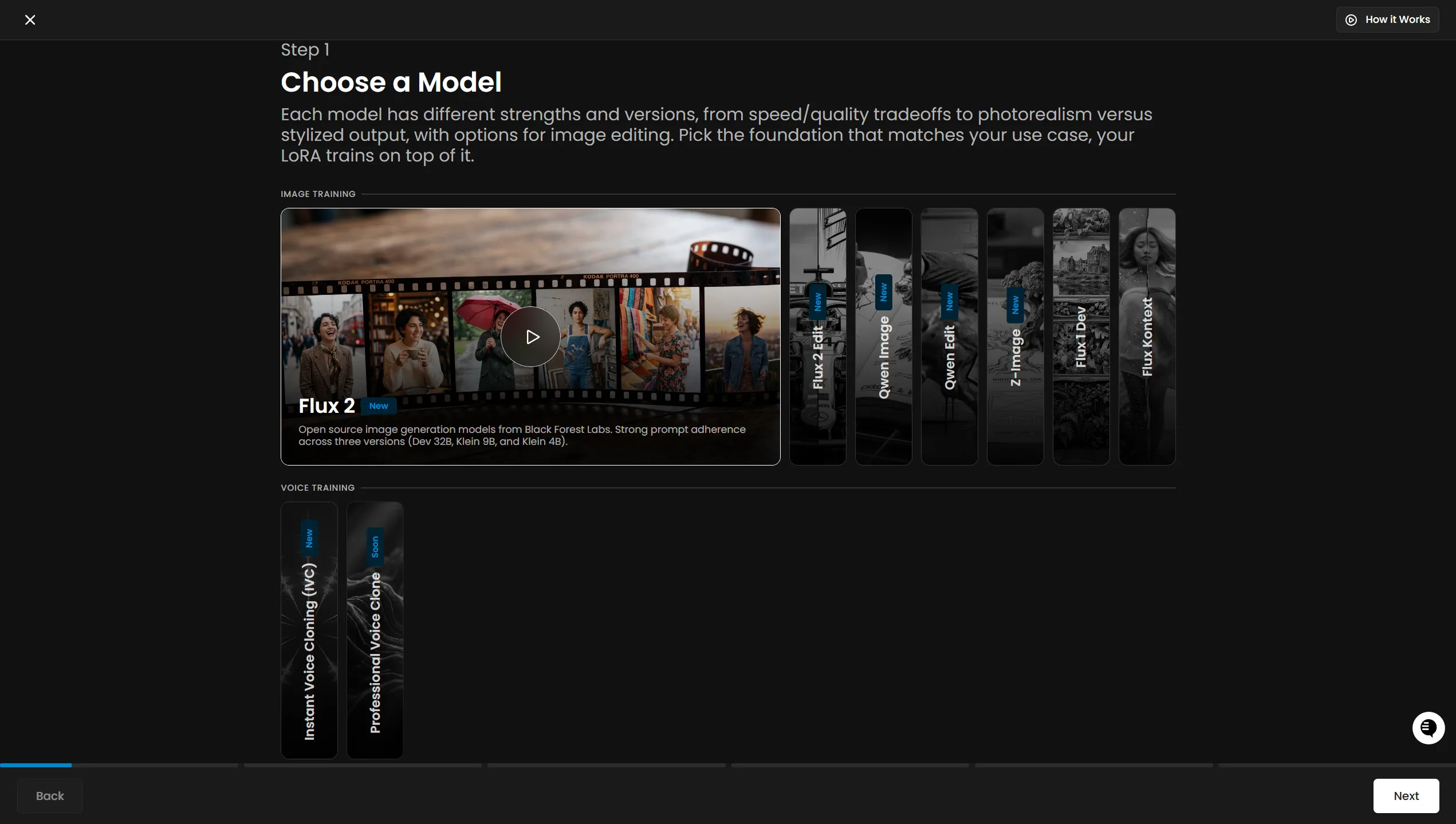
Scenario's training guide begins with choosing the foundation model for the intended task.
Pre-generated Web 2D art: entry routes, coordinated asset workflows, pixel-animation outputs, budgets, and usage conditions. Current-model consistency, animation acceptance, cleanup time, and engine performance remain unverified.
Beginner scope: First 2D candidates in the web app; custom style training comes later.
Agent scope: Generate image candidates and retrieve downloadable assets.
Confidence: learning Medium · Agent Medium
These are independent editorial judgments, not an overall score or a claim of hands-on agent integration testing.
KEY FINDINGS
The first step can be describing what you need and choosing between visual candidates. You do not need to prepare a training set before discovering whether the tool helps. Learning composition, style, and cleanup improves control as the project grows; it should not become a requirement to start.
O02O03Fracturepoint's developer reports making the game's visual assets with Scenario, while Caleb's Hollow explicitly uses it for early placeholder art. These are concrete but different stages of adoption—not evidence that every output is final, that Scenario made the entire game, or that we verified either project's quality.
U01U02The building-upgrade example describes organizing references, constraints, and controlled changes. Another creator in the discussion still struggles with an isometric camera after training. Together they suggest a useful iteration path, not a measured success rate or a guarantee that custom training locks every detail.
O04U04EDITORIAL VERDICT
Scenario is worth considering when your game needs its first art or a set of assets that share a visual direction. Start with words or an authorized reference, then add editing, workflow reuse, or training only when they solve a real problem. We would not restrict it to disposable placeholders, but would budget for selecting, adjusting, and checking the assets you actually keep.
BETTER FIT
POORER FIT
WORKFLOW FIT
Describe a small set of related objects, their game role, dimensions, and style. Generate a few candidates and choose an anchor before expanding the set.
Reuse the reference and task structure, then edit what misses the goal. Consider a custom style only when a recurring requirement justifies the setup and cost.
Align size and background treatment, export the appropriate files, and inspect them in context. For animation, also check frame layout, loops, facing, and state transitions.
RECOMMENDED WORKFLOW
Start from a testable brief, then move through prototyping, assets, audio, testing, and release with an explicit handoff and human check at every step.
SHORTEST RESPONSIBLE PATH
This is a low-risk starting workflow synthesized from the evidence.
Pick three to five related props or one character. Define where they appear and how large they will be on screen.
Use a base model with a simple description, optionally adding a reference you are entitled to upload. Treat the free tier as personal evaluation while its commercial scope remains unclear.
Compare the candidates together. Look at shape, camera, colors, and small-size readability before expanding the set or training.
Check the plan and task estimate before paid work. Save the settings and originals; budget separately for editing, background processing, and enlargement.
Place the results in the game, count what you accept, and record spending plus cleanup time. Use that evidence to decide whether a subscription, custom training, or more generation is worthwhile.
PRICING & RIGHTS
Pricing and terms last checked: Aug 31, 2026
Starter monthly: $15 ÷ 1,500 CU = $0.01/CU. Use the documented FLUX.2 Dev default of 3 CU per image, without custom training or additional reference/editing steps. These are alternative uses of one monthly allocation, assuming it is fully used—not per-asset retail prices or measured acceptance rates.
O09O10O11O12O13Theoretical allocation cost for one default FLUX.2 Dev image. A different model, resolution, or operation changes the quote; this is not a guaranteed usable asset.
12 × 3 CU, generating each icon separately. This is a draft set before selection, consistency checks, background cleanup, resizing, and game integration.
12 × 3 candidates × 3 CU = 36 raw images. A planned choice budget, not evidence that three tries will produce an accepted icon.
12 × 5 × 3 CU = 60 raw images. Compare this allowance with changing the reference or approach, rather than assuming more attempts always solve the problem.
Alternatively: 500 individual images, or 41 one-option, 13 three-option, or 8 five-option icon batches, rounded down. Do not add them together. The subscription still costs $15 even if you only use a small fraction; these are not accepted asset sets.
Custom training needs at least Pro ($45 monthly), plus task-specific CU. Training previews, edits, background removal, enlargement, and pixel-animation generation need their own quotes. Those costs and the number accepted are unknown, so the $0.03 base-image estimate cannot stand in for the full workflow.
Actual accepted-asset cost = (task-attributable subscription and unused-quota allocation + top-ups + other tools + labor) ÷ accepted assets. Acceptance and cleanup time are unknown; if none are accepted, there is no finite accepted-unit price. Save your actual task quotes and do not count relaxed-mode marketing as unlimited output.
The pricing page permits commercial use on paid plans but limits Free outputs to personal evaluation; broader FAQ and terms wording is not fully aligned. Until clarified, do not rely on free outputs for a commercial release. Paid access still requires input rights and compliance with applicable conditions; it does not guarantee exclusive copyright or clear third-party rights. This is not legal advice.
Subscriptions renew automatically and fees are generally non-refundable. A provider-confirmed technical failure can require task-ID/support handling; a result you simply reject is not a free retry. The terms describe limited, revocable cooldown access, not unlimited compute, despite the pricing page's relaxed-mode wording.
PRODUCTION RISKS
Compare camera, proportions, silhouettes, and readability across a set. One user's agent/direct comparison reports different results but is explicitly uncontrolled; it is a reason to record inputs and settings, not proof that one access route is better. Animation needs separate frame and loop checks.
O08U03U04The pricing summary promises no training reuse, while the July 16 terms and privacy policy allow self-serve content to improve services and AI. Stronger enterprise protections depend on signed agreements. Until your requirements are resolved, use non-confidential inputs—not an assumption that private work is made public.
O10O16O17Help describes a downloadable custom-model export, but section 4.4 of the terms restricts extracting or downloading model weights. We cannot promise portable LoRAs while that conflict remains. This is separate from ordinary asset-file exports such as PNG.
O16O18Training previews, alternative candidates, edits, and automated calls can all use the same allocation. An API or Unity plugin being available does not establish a stable production pipeline. Keep file copies, track each operation, and reserve time for the game's actual acceptance check.
O13O15O20O22O24NOT VERIFIED
RESEARCH METHOD
The research checked 24 official sources; this page selects 20 and links all 6 concrete usage records across 5 platforms: Reddit, itch.io, LinkedIn, Substack, and Devpost. LinkedIn contributes 2 of 6 (33.3%). Two cases are from 2023; the potential competitor interest in U05 is downweighted. Removing U05 leaves 5 records across 4 platforms, not a current-model benchmark. GameDev.net and relevant engine/art communities were searched without qualified cases; inaccessible articles were excluded. Posts and related project links are deduplicated, not a representative satisfaction sample.
Multimodal creation, Apps, Workflows, and Genie. Product scope, not independent proof of quality or time savings.
Generation, editing, training, and output formats. Broad commercial-use and data assurances must be read alongside the current pricing and legal conditions.
Start with a base model, consider platform styles, then train only if needed. Training is not an entry requirement.
Image and edit-pair training routes, dataset preparation, model families, and previews. Dataset needs and costs vary by task.
A character's directional views, not eight chronological frames of a walk cycle.
Character parts for subsequent preparation and rigging. The sheet is not an already-rigged Spine or Live2D project.
Animation styles, native dimensions, GIF, and PNG sprite-sheet output; rechecked August 31. No current task price or tested engine import is established.
Rechecked August 31: the list still carries a May 25 data stamp. FLUX.2 Dev appears under Starter, Retro Diffusion Animation under Pro; confirm current access in the model picker.
Monthly prices and public annual-selector data rechecked August 31. Free commercial use, annual credits, privacy, and relaxed-mode wording retain documented conflicts.
CU allowances, compute discounts, seats, and monthly expiry. Rechecked August 31; illustrative task costs are not universal rates.
Rechecked August 31: FLUX.2 Dev is listed at 3 credits per image for the documented default configuration. Model and resolution changes require a fresh quote.
Task estimates, shared Web/API credits, variable training and preview costs, and separate top-up expiry. No flat all-in asset price.
Reserved credits and provider-confirmed failure handling. An unwanted result is not automatically a refundable technical failure.
Rights, model-weight restrictions, self-serve content use, billing, and cooldown conditions; rechecked August 31. Ownership is not a copyright or exclusivity guarantee.
Self-serve content may support AI improvement; stronger enterprise protections rely on signed agreements. Rechecked August 31, not a confidentiality certification for this project.
The described export flow still conflicts with the terms' model-weight restriction on August 31. Asset-file export and model portability are different questions.
The release opens API access to Starter, superseding an older Pro-only help article. Access is not free generation or verified integration.
Optional agent-based creation and workflow access. No account was connected or billable operation executed for this review.
A recent Genie and homepage update. Historical usage accounts do not benchmark this release or every underlying model.
An API-backed Unity Editor integration exists. Installation, current-version compatibility, and runtime performance were not tested.
Icy-Requirement5701 reports making visual assets one by one for the project. Post and replies count once; self-promotion, with Scenario relationship, plan, model, and cost unknown. We did not play the game.
twistedweasel uses Scenario for early placeholder art in a Canvas strategy project. Not evidence of final commercial art; project promotion, with vendor relationship, model, and spending unknown.
Reports differences between agent-mediated and direct creation while exploring Scenario/Meshy. The author calls it uncontrolled; absolute date, model settings, plan, cost, and commercial relationship are unconfirmed.
An artist's building-variant workflow, with a separate comment about difficult camera consistency. The comment is not another core case. Absolute date, model, plan, spending, and vendor relationship unknown; no image-by-image quality audit.
Historical first-hand shield/avatar training attempts, not a current benchmark. The author discloses no sponsorship or affiliation but is building a related AI offering; downweighted for potential competitor interest.
A Unity prototype reporting map-image inputs and generated locations. February 10, 2023 is the project start, not a confirmed post date. Related blog/repository count once; plan, cost, and vendor relationship unknown.
DISCLOSURE
This review used no affiliate links, sponsorship, vendor account or credits, interview, or technical support. Third-party self-promotion and uncertain relationships are labeled. Owner Review passed on August 31, 2026. We did not register, upload artwork, train a model, generate assets, or run an engine integration for this review.
This public research review will be revisited when pricing, terms, product versions, or material new evidence changes.