PRODUCT UPDATE / Unreal Engine · AI-assisted editing
Wingman 0.22.3 expands animation editing in Unreal Engine 4.27
The November 4 update brings Animation Blueprints and animation FBX imports to Wingman’s Unreal Engine 4.27 build. Chat replies also link directly to assets and list edits by asset.
Developers maintaining UE 4.27 projects can use the expanded animation tools and inspect edited assets from chat. Retargeting and animation keyframing still require the UE 5 build.
LocoDev released Wingman 0.22.3 on November 4. The AI assistant inside Unreal Editor can now work on Animation Blueprints and import FBX animations in its Unreal Engine 4.27 build. Developers maintaining an older project can use it to bring a clip onto an existing skeleton and work on the Blueprint that plays it.
Animation Blueprints and FBX imports reach 4.27
Wingman first shipped a 4.27 build in October. This release adds tools for animation curves, notifies and composites, along with Behavior Trees, Enhanced Input, Level Sequences and physics assets. The release notes also describe setting up cloth on part of a skeletal mesh, such as a cape, across the supported engine versions.
Animation retargeting and keyframe editing still require the UE 5 build, as do State Trees and glTF animation tools. The new Dataflow graph tools require UE 5.6 or newer. These limits matter if your project needs to transfer a motion to a different skeleton after importing the FBX.
Chat replies link to assets and show edits
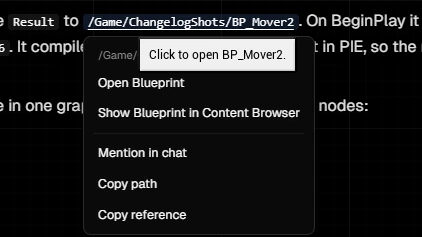
Paths in a reply open assets in the editor. The link menu can also locate an asset in the Content Browser or copy its reference. If Wingman changes a movement Blueprint, you can open it directly from the reply.
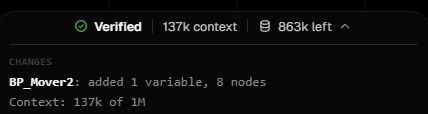
The indicator below the reply expands to show what changed in each asset and how much context the session used. In LocoDev’s example, it lists one variable and eight nodes added to BP_Mover2. You can use that list to find the graph to review before committing it.
Windows builds and AI provider costs
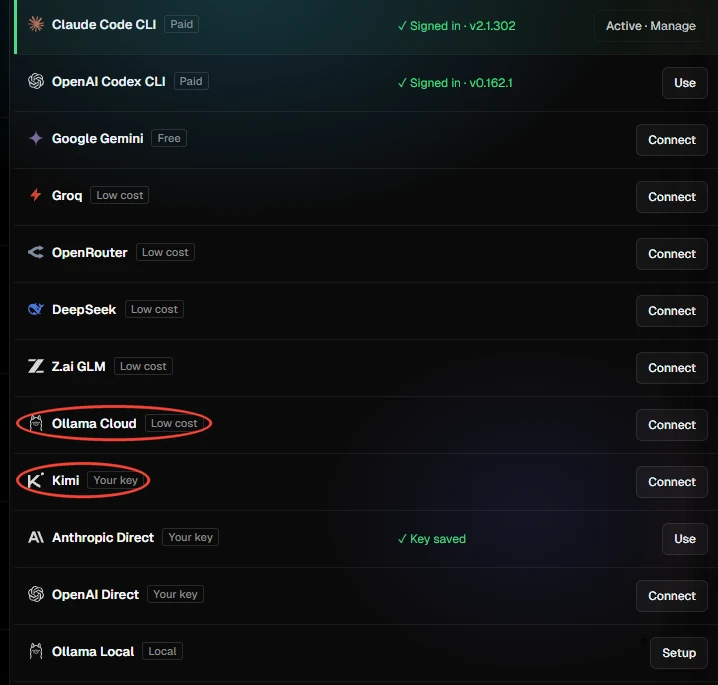
LocoDev provides separate builds for UE 4.27 and each release from 5.5 through 5.8. The builds run on 64-bit Windows 10 and 11. The update adds Ollama Cloud and a Kimi connection that uses your own key. The free plan includes 100 Wingman prompts per month, and Premium raises the allowance to 10,000 for $20 per month. The allowance also counts billable external MCP calls. Your selected AI provider handles its own billing. Download builds · Plan details
If you are starting a project and still choosing an engine, see our guide to choosing a game engine for AI-assisted development.
Sources (3)
Written with AI using public LocoDev release notes and documentation. Editorial review follows the automatic product-update policy.