ANALYSIS / Game prototyping · Case study
From AI assets to a playable prototype: a Square Enix designer's workflow
A CEDEC 2026 case study follows a game designer through AI-assisted prototyping, from planning and asset generation to the work still needed inside the engine.
For game designers and solo developers who want to turn a proposal into a playable demo and plan the work between tools.
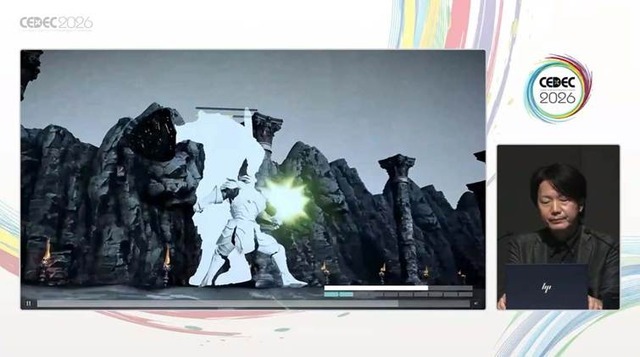
At CEDEC 2026 on July 24, Square Enix game designer Tsukasa Toya presented an experiment in AI-assisted prototyping by a non-engineer. A GameSpark report published on September 7 describes the result: assets and code generated in separate steps, then assembled in Unity 6 into a playable action demo.
Building the gameplay inside Unity
The session covered planning, task breakdown, asset and code generation, engine implementation, and refinement. The designer organized those stages and decided what the demo should let a player experience.
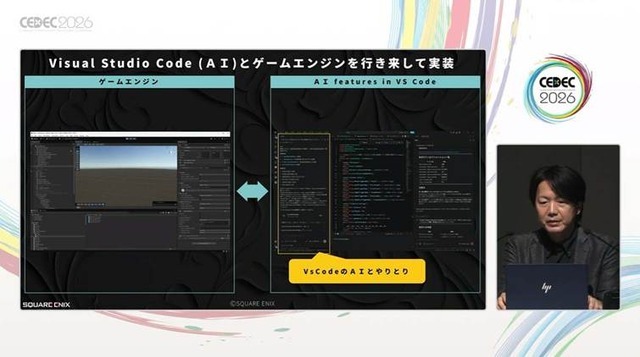
The development setup paired VS Code with Unity. Working with AI in the editor and returning to the engine keeps the running game part of the process. Once code executes, there is still a design question to answer: does the interaction behave as intended?
A generated character still needs a working rig
Character work began with a Midjourney reference image and a Tripo model. Both appearance and rigging needed attention. One Meshy example in the presentation shows the arm and coat connected, leaving the character visibly distorted.
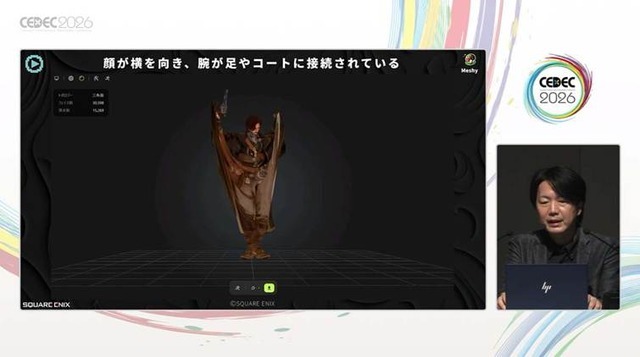
A rig controls how a model deforms during animation, and automatic rigging has input requirements of its own. For example, Adobe's Mixamo guidance calls for a centered character in a default or neutral pose. Extra limbs and large clothing or hair can cause problems.
That makes an early movement test useful when preparing a character. Check the body structure, rig and a basic animation before spending more time on detailed clothing and accessories.
Give the prototype a specific gameplay question
A small playable interaction provides a practical starting point. For a melee attack, decide how the character moves, how a hit registers, and what feedback follows. A demo that implements those decisions gives the team something concrete to discuss and helps direct later asset revisions.
Toya framed the work as an exploration toward future practical use. It suggests a route for designers to build prototypes, with asset preparation, functional checks and refinement still part of the project.
The CEDiL entry lists the presentation and an AGENTS.txt file. Downloading the materials requires signing in.
Sources (4)
No sponsorship or affiliate links in this article.